Skip to content
View in the app

A better way to browse. Learn more.

DoniaWeB

A full-screen app on your home screen with push notifications, badges and more.

To install this app on iOS and iPadOS
  1. Tap the Share icon in Safari
  2. Scroll the menu and tap Add to Home Screen.
  3. Tap Add in the top-right corner.
To install this app on Android
  1. Tap the 3-dot menu (⋮) in the top-right corner of the browser.
  2. Tap Add to Home screen or Install app.
  3. Confirm by tapping Install.
     

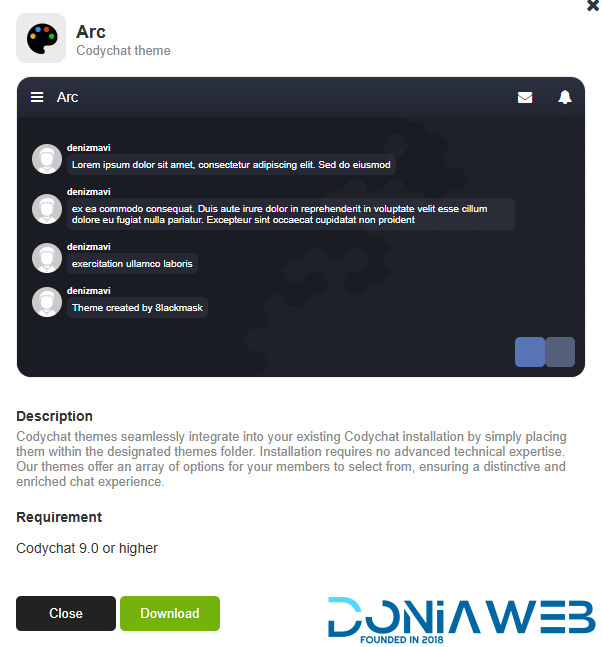
Codychat Theme: Arc 9.0

(0 reviews)

1 Screenshot

Codychat themes seamlessly integrate into your existing Codychat installation by simply placing them within the designated themes folder. Installation requires no advanced technical expertise. Our themes offer an array of options for your members to select from, ensuring a distinctive and enriched chat experience.

Codychat themes 8.0 - 9.0 themes
User Feedback

Recommended Comments

ShadowMoon

Members

This theme comes preinstalled in the Cody V9 system and it looks very good. Personally, it’s the only theme I use. Tested on PHP 8.1. Thanks to the uploader for the effort of adding this theme, much respect.

opera_YrOmCYcnPn.jpg

opera_u6ZFovLIeo.jpg

Join the conversation

You can post now and register later. If you have an account, sign in now to post with your account.
Note: Your post will require moderator approval before it will be visible.

Guest
Unfortunately, your content contains terms that we do not allow. Please edit your content to remove the highlighted words below.
Add a comment...

Other files from PowerDNS

Account

Navigation

Search

Search

Configure browser push notifications

Chrome (Android)
  1. Tap the lock icon next to the address bar.
  2. Tap Permissions → Notifications.
  3. Adjust your preference.
Chrome (Desktop)
  1. Click the padlock icon in the address bar.
  2. Select Site settings.
  3. Find Notifications and adjust your preference.