









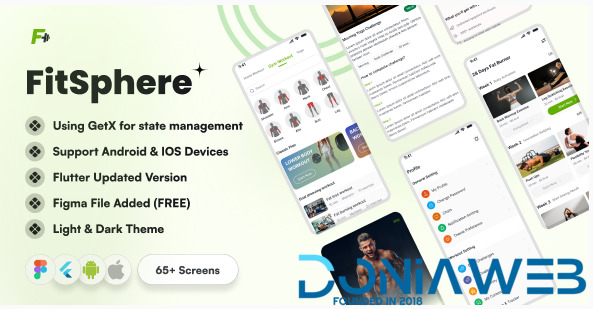
Supercharge Your Fitness App Development with This Premium Flutter UI Kit
Say goodbye to weeks of UI design and frontend coding. This meticulously crafted Flutter UI Kit delivers a complete, production-ready foundation for your next fitness, wellness, or health-tracking app—fully responsive, pixel-perfect, and tailored for both Android and iOS.
Built entirely in Flutter (Dart), every screen uses clean, modular, and reusable widgets—making it effortless to adapt the look, feel, and flow to match your brand identity and business goals.
✨ Key Features
Dual Theme Support: Seamlessly switch between sleek Light and Dark modes—auto-sync with system settings or let users choose manually.
65+ Production-Ready Screens: From onboarding to advanced analytics, covering all core fitness user journeys.
Smart Workout Plans: Intuitive interfaces for building, editing, and tracking routines—HIIT, Strength, Cardio, Yoga, and more.
Visual Progress Tracking: Beautifully rendered charts for weight, BMI, body measurements, and goal milestones.
Trainer & Gym Profiles: Showcase bios, ratings, service offerings, pricing packages, and contact options.
Secure OTP Auth Flow: Minimal, user-friendly login and sign-up screens with mobile verification.
Blazing Fast Performance: Optimized for smooth 60 FPS across all device types.
Developer-Friendly Code: Well-documented, logically structured, and easy to customize—no spaghetti code here.
🔥 Highlights
100% Flutter (Dart) – No third-party frameworks
Fully responsive & adaptive layout
Lightweight architecture with zero bloat
Consistent design language across all screens
Reusable component library for rapid iteration
💡 Perfect For
Gym & Fitness Center Apps
Personal Trainer Booking Platforms
Workout Planner & Activity Loggers
Yoga, Pilates, and Mindfulness Applications
Health & Lifestyle Startups
📦 What’s Included
Complete Flutter source code (ready to run)
Light & Dark theme variants for every screen
All custom icons, illustrations, and assets
Step-by-step setup & customization guide
You may only provide a review once you have downloaded the file.
There are no reviews to display.