





Skip to content
View in the app

A better way to browse. Learn more.

DoniaWeB

A full-screen app on your home screen with push notifications, badges and more.

To install this app on iOS and iPadOS
  1. Tap the Share icon in Safari
  2. Scroll the menu and tap Add to Home Screen.
  3. Tap Add in the top-right corner.
To install this app on Android
  1. Tap the 3-dot menu (⋮) in the top-right corner of the browser.
  2. Tap Add to Home screen or Install app.
  3. Confirm by tapping Install.
     

Wavvy - WhatsApp Multi-Session Bot Platform 1.0.0

(0 reviews)

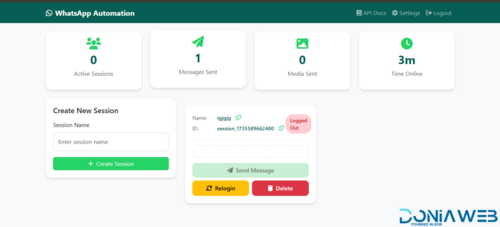
1 Screenshot

Wavvy is a comprehensive WhatsApp automation and management platform built with Node.js and Baileys. It enables users to manage multiple WhatsApp sessions simultaneously with advanced messaging capabilities, AI integration, and subscription-based access control.

Core Features

Multi-Session Management

Connect and manage multiple WhatsApp accounts simultaneously

QR code authentication for easy session setup

Automatic session restoration and reconnection

Real-time session status monitoring

Session ownership and isolation per user

Bulk Messaging & Campaigns

Create and schedule bulk messaging campaigns

Multiple sending strategies: sequential, random, round-robin, balanced, and burst modes

Support for all message types: text, images, videos, documents, audio, stickers, locations, contacts, polls, and view-once media

Campaign pause/resume functionality with state persistence

Detailed delivery tracking and analytics

Automatic campaign resumption after server restart

Contact Management

Organize contacts into custom groups with color coding

Import and manage contact lists

Mark favorites for quick access

WhatsApp number validation and verification

Bulk number checker with validity detection

AI Assistant Integration

Multi-provider support: OpenAI, DeepSeek, Google Gemini, and OpenRouter

Customizable system prompts and knowledge bases

Conversation memory with configurable context length

Adjustable temperature and token limits

Per-session AI configuration

Auto-Reply System

Multiple trigger types: exact match, contains, starts with, ends with, regex

Multi-message responses with media support

Shareable auto-reply configurations

Option to reply to self-messages

Session-specific auto-reply rules

Message Templates

Save and reuse message templates

Support for all media types and advanced message formats

Template favorites and usage tracking

Template data storage for complex message types (polls, locations, contacts)

Subscription & Plan Management

Five-tier subscription system: Free, Starter, Professional, Business, Enterprise

Flexible billing cycles with automatic expiry tracking

Usage-based limits: messages, sessions, contacts, templates, API requests

Feature gating: AI assistant, auto-reply, API access

Automatic quota reset for free users

Admin panel for plan assignment

API Access

RESTful API with API key authentication

Rate limiting per subscription tier

Comprehensive API documentation

Separate web and external API endpoints

Usage tracking and analytics

Phone Verification

OTP-based phone number verification

WhatsApp-based OTP delivery

Country code support

Verification status tracking

Security & Authentication

Google OAuth 2.0 integration

Local authentication with bcrypt password hashing

CSRF protection for web interface

Session management with MySQL store

Helmet.js security headers

XSS protection and input sanitization

API key-based authentication for external access

Admin Features

User management and banning

Plan assignment and tier management

System-wide usage monitoring

API usage analytics

Session oversight

Technical Stack

Backend

Node.js with Express.js

Baileys (WhatsApp Web API)

MySQL database with connection pooling

Passport.js for authentication

Winston for logging

Node-cron for scheduled tasks

Frontend

EJS templating engine

Responsive web interface

Real-time updates via Socket.io

Bootstrap-based UI

Storage & Media

File uploads with Multer

Sharp for image processing

Session data persistence

Media file management

Security & Performance

Rate limiting with express-rate-limit

CORS configuration

Helmet security middleware

LRU cache for OpenRouter models

Graceful shutdown handling

Automatic cleanup services

Use Cases

Marketing agencies managing multiple client WhatsApp accounts

Customer support automation with AI-powered responses

Bulk notification systems

WhatsApp number validation services

Multi-tenant WhatsApp management platforms

Automated customer engagement campaigns

Default Admin Access

Email: [email protected]

Password: admin123 (should be changed immediately after first login)

User Feedback

Recommended Comments

Bagadat

Members

On 3/17/2026 at 11:00 AM, paijoojiap said:

kapan versi terbaru di publis ini

SCR-20260317-uqut.png

hey bro thats a edit with paint?

Bagadat

Members

wavvy-whatsapp v1.2.0

Built on top of @Crypto Dash v14.7.0 base.

What's new/fixed

  • Campaign success rate was reporting half the real percentage (denominator bug) — fixed

  • Campaign details preview now shows the actual photo/footer/buttons, not just raw text

  • 404 placeholder image when a campaign's template media was deleted

  • Fixed the "Update Rule" button on Auto-Reply edit (was completely broken)

  • Added a WhatsApp formatting toolbar (bold/italic/strike/code/quote) to Auto-Reply text & media replies

  • Live message preview on every Auto-Reply reply type while editing

  • DB: added button template type support

Full breakdown of every fix is in CHANGELOG.md.

Migrating from base v14.7.0 → this version

  1. Pull the updated code files over your install (controllers/views/public-js, per CHANGELOG.md).

  2. Back up your DB first:

    mysqldump -u <user> -p <db> > backup.sql
    
  3. Run the included migration against your existing DB — only adds the missing button value to the media_type ENUM, doesn't touch existing data:

    mysql -u <user> -p <db> < database/migration/001_add_button_to_media_type_enum.sql
    
  4. Restart the app.

Fresh install instead?

Just import database/database.sql directly — full schema already included, nothing else needed.

No pass:

wavvy-whatsapp-1.2.0.zip

Bagadat

Members

(edited)

🚀 Wavvy v1.3.0 - Bagadat Fork

Interactive buttons — now working on Android and iOS 🎉 Previously only rendered on Android. We fixed the message structure so WhatsApp renders them on iPhone too.

⚠️ Note: buttons still don't show on WhatsApp Web/Desktop — that's a limitation of WhatsApp's own web client, not the app.

Buttons in Auto-Reply 🔘 Auto-reply rules now support button messages (same as templates and campaigns): text + optional footer + optional image + up to 4 buttons (Quick Reply, URL, Call, Copy Code), with live preview while you build it.

wavvy-whatsapp-1.3.0.zip

wavvy 1.3.0 - button auto-reply.png

Edited by Bagadat

Bagadat

Members

[1.3.1 - Fork Version] - Stable

Fixed

  • Button-type message templates were grouped under "Text Templates" instead of their own section in the template selector, on both the Send Message page and the Campaign creation page. The grouping object used to build the dropdown's <optgroup>s was missing a button key, so the type check silently fell through to the text group. (public/js/send-message.js, public/js/campaign-create.js) — 7ce14af

  • Image preview for the button reply message type in Auto-Reply rules (create and edit pages) did not load:

    • The local preview used URL.createObjectURL() (a blob: URL), but the app's Content-Security-Policy only allows 'self', data:, and https: for img-src. The image request was silently blocked. Replaced with a downscaled JPEG thumbnail (max 480px, generated via FileReader + Image + canvas.toDataURL()), which uses an already-whitelisted data: URL and avoids the lag of inlining a multi-MB base64 photo.

    • In the create page specifically, the preview's early-exit check ran before the image/file was evaluated, so picking an image without first typing a message or adding a button caused the function to bail out and never render anything. Reordered to evaluate the file first. (public/js/auto-reply-create.js, public/js/auto-reply-edit.js) — 61b4e95

  • Footer Text field on the Send Message page (manual Button Message) had no input listener, so the live preview only updated after editing a different field. (public/js/send-message.js)

  • The ?session=<id> query parameter on the Send Message page no longer reliably preselected the WhatsApp session dropdown. It relied on a fixed setTimeout(500ms) racing against the async loadSessions() fetch; on a slow request the dropdown had no options yet and the assignment silently failed. Now awaits loadSessions() before reading the query parameter. (public/js/send-message.js) — 5e4e0c5

wavvy-whatsapp-1.3.1.zip

Bagadat

Members

(edited)

[1.4.0 - Fork Version] - Stable

What's New

🪝 Webhooks Module — Users on Professional, Business, or Enterprise plans can now register webhooks to receive real-time HTTP notifications for:

  • Incoming messages (message_received events)

  • Session status changes (session_status events: qr, connecting, connected, disconnected)

Features:

  • Per-session webhooks with auto-generated UUID and 40-character reference code

  • Masked reference code in UI with eye-icon toggle to reveal

  • Paginated delivery logs with payload viewer (accordion with pretty-printed JSON)

  • Manual retry button for failed deliveries (fire-and-forget, no auto-retries)

  • Plan-gated via plans.feature_webhooks column

Other Changes

Fixed:

  • Webhook code regeneration now updates the visible masked code

  • Timestamp consistency between message_received (unix seconds) and session_status events

  • Phone number resolution from WhatsApp's privacy-shielded @lid JIDs (no more :device suffix leaking)

  • Webhook URL validation accepts localhost and internal IPs

  • Input sanitizer no longer corrupts webhook URLs

📖 Documentation:

  • Entire project documentation translated to English (README + all docs/ files)

  • New docs/18-webhooks.md with complete webhooks reference

Upgrading from 1.3.0

If you're on the latest version, run the database migration:

mysql -u <user> -p <database> < database/migration/1.2.0\ to\ 1.4.0\ -\ 002_create_webhooks_tables.sql

1 - 1.4.0.png 2 - 1.4.0.png

wavvy-whatsapp-1.4.0.zip

Edited by Bagadat

Join the conversation

You can post now and register later. If you have an account, sign in now to post with your account.
Note: Your post will require moderator approval before it will be visible.

Guest
Unfortunately, your content contains terms that we do not allow. Please edit your content to remove the highlighted words below.
Add a comment...

Other files from Crypto Dash

Account

Navigation

Search

Search

Configure browser push notifications

Chrome (Android)
  1. Tap the lock icon next to the address bar.
  2. Tap Permissions → Notifications.
  3. Adjust your preference.
Chrome (Desktop)
  1. Click the padlock icon in the address bar.
  2. Select Site settings.
  3. Find Notifications and adjust your preference.