Skip to content
View in the app

A better way to browse. Learn more.

DoniaWeB

A full-screen app on your home screen with push notifications, badges and more.

To install this app on iOS and iPadOS
  1. Tap the Share icon in Safari
  2. Scroll the menu and tap Add to Home Screen.
  3. Tap Add in the top-right corner.
To install this app on Android
  1. Tap the 3-dot menu (⋮) in the top-right corner of the browser.
  2. Tap Add to Home screen or Install app.
  3. Confirm by tapping Install.
     

Wavvy - WhatsApp Multi-Session Bot Platform 1.0.0

(0 reviews)

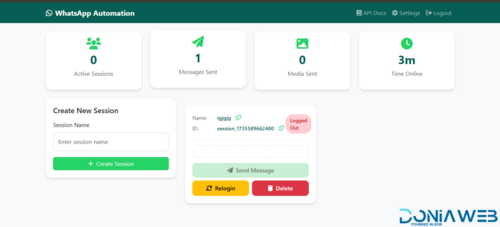
1 Screenshot

Wavvy is a comprehensive WhatsApp automation and management platform built with Node.js and Baileys. It enables users to manage multiple WhatsApp sessions simultaneously with advanced messaging capabilities, AI integration, and subscription-based access control.

Core Features

Multi-Session Management

Connect and manage multiple WhatsApp accounts simultaneously

QR code authentication for easy session setup

Automatic session restoration and reconnection

Real-time session status monitoring

Session ownership and isolation per user

Bulk Messaging & Campaigns

Create and schedule bulk messaging campaigns

Multiple sending strategies: sequential, random, round-robin, balanced, and burst modes

Support for all message types: text, images, videos, documents, audio, stickers, locations, contacts, polls, and view-once media

Campaign pause/resume functionality with state persistence

Detailed delivery tracking and analytics

Automatic campaign resumption after server restart

Contact Management

Organize contacts into custom groups with color coding

Import and manage contact lists

Mark favorites for quick access

WhatsApp number validation and verification

Bulk number checker with validity detection

AI Assistant Integration

Multi-provider support: OpenAI, DeepSeek, Google Gemini, and OpenRouter

Customizable system prompts and knowledge bases

Conversation memory with configurable context length

Adjustable temperature and token limits

Per-session AI configuration

Auto-Reply System

Multiple trigger types: exact match, contains, starts with, ends with, regex

Multi-message responses with media support

Shareable auto-reply configurations

Option to reply to self-messages

Session-specific auto-reply rules

Message Templates

Save and reuse message templates

Support for all media types and advanced message formats

Template favorites and usage tracking

Template data storage for complex message types (polls, locations, contacts)

Subscription & Plan Management

Five-tier subscription system: Free, Starter, Professional, Business, Enterprise

Flexible billing cycles with automatic expiry tracking

Usage-based limits: messages, sessions, contacts, templates, API requests

Feature gating: AI assistant, auto-reply, API access

Automatic quota reset for free users

Admin panel for plan assignment

API Access

RESTful API with API key authentication

Rate limiting per subscription tier

Comprehensive API documentation

Separate web and external API endpoints

Usage tracking and analytics

Phone Verification

OTP-based phone number verification

WhatsApp-based OTP delivery

Country code support

Verification status tracking

Security & Authentication

Google OAuth 2.0 integration

Local authentication with bcrypt password hashing

CSRF protection for web interface

Session management with MySQL store

Helmet.js security headers

XSS protection and input sanitization

API key-based authentication for external access

Admin Features

User management and banning

Plan assignment and tier management

System-wide usage monitoring

API usage analytics

Session oversight

Technical Stack

Backend

Node.js with Express.js

Baileys (WhatsApp Web API)

MySQL database with connection pooling

Passport.js for authentication

Winston for logging

Node-cron for scheduled tasks

Frontend

EJS templating engine

Responsive web interface

Real-time updates via Socket.io

Bootstrap-based UI

Storage & Media

File uploads with Multer

Sharp for image processing

Session data persistence

Media file management

Security & Performance

Rate limiting with express-rate-limit

CORS configuration

Helmet security middleware

LRU cache for OpenRouter models

Graceful shutdown handling

Automatic cleanup services

Use Cases

Marketing agencies managing multiple client WhatsApp accounts

Customer support automation with AI-powered responses

Bulk notification systems

WhatsApp number validation services

Multi-tenant WhatsApp management platforms

Automated customer engagement campaigns

Default Admin Access

Email: [email protected]

Password: admin123 (should be changed immediately after first login)

User Feedback

Recommended Comments

Crypto Dash

Members

3 minutes ago, IT The Explorer said:

bagaimana cara installnya di Easypanel?

I never used easypanel so I can't say

spacibekti

Members

apakah ini sama dengan yang Magd Whatsapp Gateway | Multi Device v12.0.1

digil digil

Members

how to install on cpanel or direct admin

Mastermind529

Members

Node project is not starting as shown in video, getting error : Please go to the [Module] and click [One-key install] to install the module dependencies!

already tried installing this , still same error , i have same version shown in installation video.

anything missing ? also i need to add same domain in website or anything else ?

IT The Explorer

Members

saya coba di Cpanel tampilannya berantakan dan QR ga bisa muncul, haha, coba di enchance lagi aplikasinya

2026-01-28_115224.png

Bagadat

Members

WOW, what a program! SUPER NICE! I think for better AI implementation, you could save and restore the conversation every 15 minutes if we don't have any more responses! Or, for programmers and API keys, you could create a websocket and use that tunnel to connect to local AI, like phi-4, qwen, or others, like ollama or lmstudio.

By the way, SUPER NICE BROTHER, I love your system.

Gusik Prasetyo

Members

On 1/27/2026 at 11:56 PM, paijoojiap said:

Oke di coba

bagaimana hasilnya om?

Bagadat

Members

On 1/27/2026 at 11:33 AM, Mastermind529 said:

Node project is not starting as shown in video, getting error : Please go to the [Module] and click [One-key install] to install the module dependencies!

already tried installing this , still same error , i have same version shown in installation video.

anything missing ? also i need to add same domain in website or anything else ?

in aapanel try this:
Install PM2 and Node Version Manager from store:
image.png

Click settings on pm2 and go to node version and choose 22.22.0,

image.png

After go to file explorer, next to project, open a terminal, and put ```npm install```

Next start the node website, and it will be ready bro ;)

Mastermind529

Members

On 1/30/2026 at 7:50 AM, Bagadat said:

in aapanel try this:
Install PM2 and Node Version Manager from store:
image.png

Click settings on pm2 and go to node version and choose 22.22.0,

image.png

After go to file explorer, next to project, open a terminal, and put ```npm install```

Next start the node website, and it will be ready bro ;)

Thank you

Crypto Dash

Members

On 1/27/2026 at 10:33 PM, Mastermind529 said:

Node project is not starting as shown in video, getting error : Please go to the [Module] and click [One-key install] to install the module dependencies!

already tried installing this , still same error , i have same version shown in installation video.

anything missing ? also i need to add same domain in website or anything else ?

Delete node modules folder and install again

Mastermind529

Members

4 minutes ago, Crypto Dash said:

Delete node modules folder and install again

Thanks , after creating campaign showing this error.

Screenshot 2026-02-02 at 10.17.11 PM.png

paijoojiap

Members

auto reply tidak mendukung button dan list ?. why

Mastermind529

Members

On 2/2/2026 at 10:18 PM, Mastermind529 said:

Thanks , after creating campaign showing this error.

Screenshot 2026-02-02 at 10.17.11 PM.png

anyone can help ?

digil digil

Members

22 hours ago, Mastermind529 said:

anyone can help

22 hours ago, Mastermind529 said:

anyone can help ?

restart node arew you on cppanel?

Mastermind529

Members

1 minute ago, digil digil said:
  22 hours ago, Mastermind529 said:

anyone can help

i have aapanel , node is working , other features is also working ...

Mastermind529

Members

14 hours ago, digil digil said:

you fixed?

no same issue

paijoojiap

Members

kapan versi terbaru di publis ini

SCR-20260317-uqut.png

IT The Explorer

Members

18 minutes ago, paijoojiap said:

kapan versi terbaru di publis ini

SCR-20260317-uqut.png

kapan ini update versi terbarunya..jangan lupa tambahkan webhook untuk n8n @Crypto Dash

Join the conversation

You can post now and register later. If you have an account, sign in now to post with your account.
Note: Your post will require moderator approval before it will be visible.

Guest
Unfortunately, your content contains terms that we do not allow. Please edit your content to remove the highlighted words below.
Add a comment...

Other files from Crypto Dash

Account

Navigation

Search

Search

Configure browser push notifications

Chrome (Android)
  1. Tap the lock icon next to the address bar.
  2. Tap Permissions → Notifications.
  3. Adjust your preference.
Chrome (Desktop)
  1. Click the padlock icon in the address bar.
  2. Select Site settings.
  3. Find Notifications and adjust your preference.