









Fix Duplicate Records and Table Bloat

By
· 531 views
This guide addresses a common issue in Ultimate POS where the transaction_sell_lines_purchase_lines table develops duplicate records and becomes bloated, consuming excessive disk space. This typically happens due to data synchronization issues or improper cleanup processes.
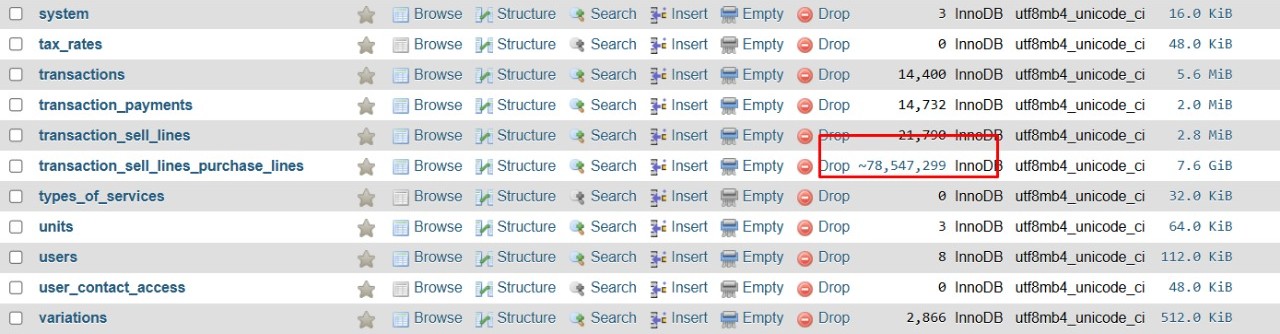
Table showing excessive size before optimization
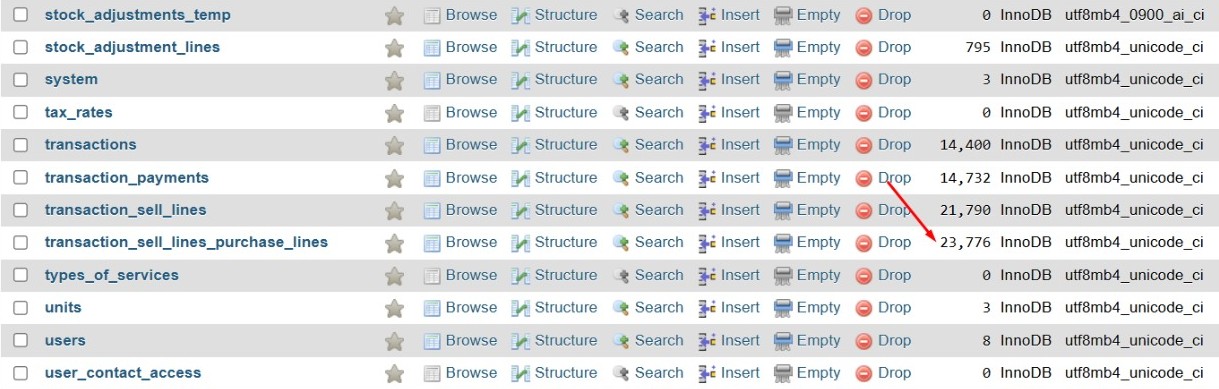
Table size successfully reduced after applying the fix
Symptoms
Large table size (several GB) with relatively few records
Duplicate entries in transaction data
Poor database performance
Disk space issues
Prerequisites
Backup Required
Always create a database backup before performing these operations!
Database administrator access
phpMyAdmin or MySQL command line access
Maintenance window (operations will lock the table)
Solution
Step 1: Verify the Issue
First, check if you have duplicate records:
SELECT stock_adjustment_line_id, purchase_line_id, quantity, qty_returned, created_at, updated_at, COUNT(*) as duplicate_count
FROM transaction_sell_lines_purchase_lines
GROUP BY stock_adjustment_line_id, purchase_line_id, quantity, qty_returned, created_at, updated_at
HAVING COUNT(*) > 1;
Check current table size:
SELECT
    table_name,
    ROUND(((data_length + index_length) / 1024 / 1024), 2) AS "Size in MB"
FROM information_schema.tables
WHERE table_name = 'transaction_sell_lines_purchase_lines'
AND table_schema = DATABASE();
Step 2: Remove Duplicate Records
Table Lock Warning
This operation will lock the table during execution. Perform during low-traffic periods.
DELETE FROM transaction_sell_lines_purchase_lines
WHERE id NOT IN (
    SELECT min_id FROM (
        SELECT MIN(id) as min_id
        FROM transaction_sell_lines_purchase_lines
        GROUP BY stock_adjustment_line_id, purchase_line_id, quantity, qty_returned, created_at, updated_at
    ) as keeper_ids
);
This query:
Keeps the record with the lowest
idfor each unique combinationRemoves all duplicate records
Preserves data integrity by maintaining foreign key relationships
Step 3: Force Table Rebuild (Fix Bloat)
After removing duplicates, the table may still appear large because MySQL doesn't automatically reclaim space. Force a complete rebuild:
-- Create new table with same structure
CREATE TABLE transaction_sell_lines_purchase_lines_new LIKE transaction_sell_lines_purchase_lines;

-- Copy all remaining data
INSERT INTO transaction_sell_lines_purchase_lines_new
SELECT * FROM transaction_sell_lines_purchase_lines;

-- Replace the old table
DROP TABLE transaction_sell_lines_purchase_lines;

RENAME TABLE transaction_sell_lines_purchase_lines_new TO transaction_sell_lines_purchase_lines;
Step 4: Verification
Verify duplicates are gone:
SELECT COUNT(*) as duplicate_groups
FROM (
    SELECT stock_adjustment_line_id, purchase_line_id, quantity, qty_returned, created_at, updated_at
    FROM transaction_sell_lines_purchase_lines
    GROUP BY stock_adjustment_line_id, purchase_line_id, quantity, qty_returned, created_at, updated_at
    HAVING COUNT(*) > 1
) as dup_check;
Check final table size:
SELECT
    table_name,
    ROUND(((data_length + index_length) / 1024 / 1024), 2) AS "Size in MB"
FROM information_schema.tables
WHERE table_name = 'transaction_sell_lines_purchase_lines'
AND table_schema = DATABASE();
Check record count:
SELECT COUNT(*) as total_records FROM transaction_sell_lines_purchase_lines;
Expected Results
Duplicate groups: 0
Table size: Significantly reduced (should be appropriate for the number of records)
Record count: Only unique records remain
Performance: Improved query speeds
Troubleshooting
phpMyAdmin LIMIT Error
If you encounter "LIMIT 0, 25" errors when creating temporary tables, this is due to phpMyAdmin automatically adding pagination. Use the single-query approach provided in Step 2 instead.
InnoDB Optimize Not Supported
If you see "Table does not support optimize, doing recreate + analyze instead" - this is normal for InnoDB tables and should fix the bloat issue.
Large Table Size Persists
If the table remains large after optimization, use the force rebuild method in Step 3. This completely recreates the table structure and eliminates any remaining bloat.
Prevention
To prevent this issue from recurring:
Regular maintenance: Schedule periodic duplicate checks
Application review: Investigate why duplicates are being created
Monitoring: Set up alerts for unusual table growth
Backup strategy: Ensure regular backups before maintenance
Additional Notes
This procedure is specifically tested with Ultimate POS systems
The table structure includes fields:
id,sell_line_id,stock_adjustment_line_id,purchase_line_id,quantity,qty_returned,created_at,updated_atAll operations should be performed during maintenance windows
Consider upgrading Ultimate POS if this is a recurring issue
Recommended Comments