








Separating Purchase and Sell Report Permissions

By
· 433 views
This guide explains how to split the combined purchase_n_sell_report.view permission into separate purchase_report.view and sell_report.view permissions in Ultimate POS Laravel application.
Overview
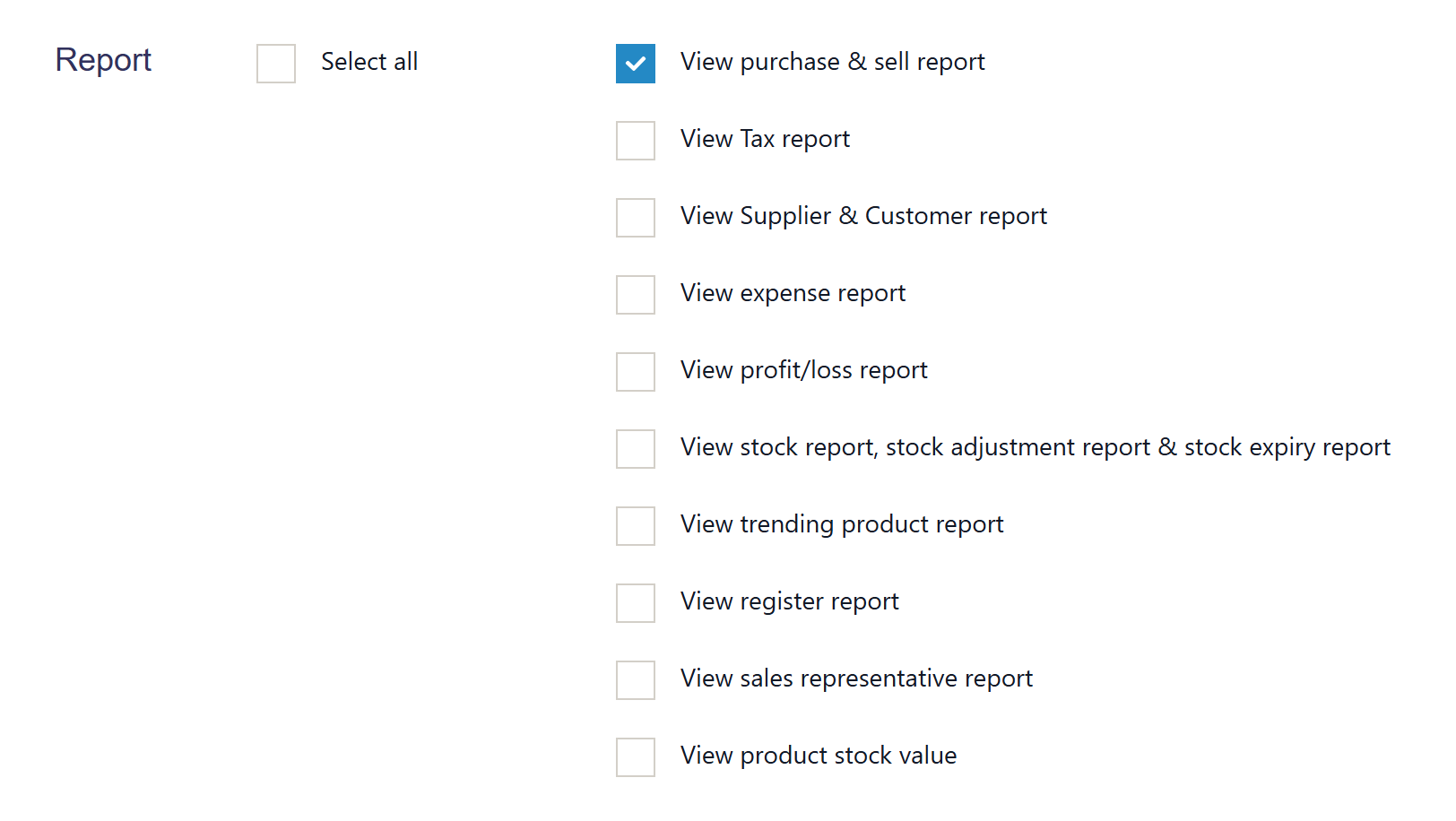
Currently, Ultimate POS uses a single permission purchase_n_sell_report.view to control access to both purchase and sell reports. This guide will show you how to separate these into two distinct permissions for better role-based access control.
Files to Modify
The following files need to be updated:
database/seeders/PermissionsTableSeeder.php- Add new permissionsapp/Http/Middleware/AdminSidebarMenu.php- Update menu visibility logicapp/Http/Controllers/ReportController.php- Update permission checksresources/views/role/create.blade.php- Update role creation formresources/views/role/edit.blade.php- Update role editing form
Step-by-Step Implementation
Step 1: Add New Permissions to Seeder
Update database/seeders/PermissionsTableSeeder.php:
<?php

namespace Database\Seeders;

use Illuminate\Database\Seeder;
use Spatie\Permission\Models\Permission;

class PermissionsTableSeeder extends Seeder
{
    public function run()
    {
        $data = [
            // ... existing permissions ...

            // Replace the old combined permission with separate ones
            // ['name' => 'purchase_n_sell_report.view'], // Remove this line
            ['name' => 'purchase_report.view'],  // Add this
            ['name' => 'sell_report.view'],      // Add this

            // ... rest of existing permissions ...
        ];

        $insert_data = [];
        $time_stamp = \Carbon::now()->toDateTimeString();
        foreach ($data as $d) {
            $d['guard_name'] = 'web';
            $d['created_at'] = $time_stamp;
            $insert_data[] = $d;
        }
        Permission::insert($insert_data);
    }
}
Step 2: Update AdminSidebarMenu Middleware
In app/Http/Middleware/AdminSidebarMenu.php, update the Reports dropdown section:
// Find the Reports dropdown section and update the permission check
if (
    auth()->user()->can('purchase_report.view') ||      // New permission
    auth()->user()->can('sell_report.view') ||          // New permission
    auth()->user()->can('contacts_report.view') ||
    auth()->user()->can('stock_report.view') ||
    auth()->user()->can('tax_report.view') ||
    auth()->user()->can('trending_product_report.view') ||
    auth()->user()->can('sales_representative.view') ||
    auth()->user()->can('register_report.view') ||
    auth()->user()->can('expense_report.view')
) {
    $menu->dropdown(
        __('report.reports'),
        function ($sub) use ($enabled_modules, $is_admin) {
            // ... other report menu items ...

            // Update the purchase & sell report condition
            if ((in_array('purchases', $enabled_modules) || in_array('add_sale', $enabled_modules) || in_array('pos_sale', $enabled_modules)) &&
                (auth()->user()->can('purchase_report.view') || auth()->user()->can('sell_report.view'))) {
                $sub->url(
                    action([\App\Http\Controllers\ReportController::class, 'getPurchaseSell']),
                    __('report.purchase_sell_report'),
                    ['icon' => '', 'active' => request()->segment(2) == 'purchase-sell']
                );
            }

            // ... rest of menu items ...
        },
        ['icon' => '...', 'id' => 'tour_step8']
    )->order(55);
}
Step 3: Update ReportController
In app/Http/Controllers/ReportController.php, update the permission checks:
/**
 * Shows product report of a business
 *
 * @return \Illuminate\Http\Response
 */
public function getPurchaseSell(Request $request)
{
    // Update permission check to allow either permission
    if (!auth()->user()->can('purchase_report.view') && !auth()->user()->can('sell_report.view')) {
        abort(403, 'Unauthorized action.');
    }

    $business_id = $request->session()->get('user.business_id');

    //Return the details in ajax call
    if ($request->ajax()) {
        $start_date = $request->get('start_date');
        $end_date = $request->get('end_date');
        $location_id = $request->get('location_id');

        $purchase_details = [];
        $sell_details = [];
        $transaction_totals = [];

        // Only fetch purchase data if user has purchase report permission
        if (auth()->user()->can('purchase_report.view')) {
            $purchase_details = $this->transactionUtil->getPurchaseTotals($business_id, $start_date, $end_date, $location_id);
        }

        // Only fetch sell data if user has sell report permission
        if (auth()->user()->can('sell_report.view')) {
            $sell_details = $this->transactionUtil->getSellTotals(
                $business_id,
                $start_date,
                $end_date,
                $location_id
            );
        }

        // Only fetch transaction totals if user has either permission
        if (auth()->user()->can('purchase_report.view') || auth()->user()->can('sell_report.view')) {
            $transaction_types = [
                'purchase_return', 'sell_return',
            ];

            $transaction_totals = $this->transactionUtil->getTransactionTotals(
                $business_id,
                $transaction_types,
                $start_date,
                $end_date,
                $location_id
            );
        }

        $total_purchase_return_inc_tax = $transaction_totals['total_purchase_return_inc_tax'] ?? 0;
        $total_sell_return_inc_tax = $transaction_totals['total_sell_return_inc_tax'] ?? 0;

        $difference = [
            'total' => ($sell_details['total_sell_inc_tax'] ?? 0) - $total_sell_return_inc_tax - (($purchase_details['total_purchase_inc_tax'] ?? 0) - $total_purchase_return_inc_tax),
            'due' => ($sell_details['invoice_due'] ?? 0) - ($purchase_details['purchase_due'] ?? 0),
        ];

        return ['purchase' => $purchase_details,
            'sell' => $sell_details,
            'total_purchase_return' => $total_purchase_return_inc_tax,
            'total_sell_return' => $total_sell_return_inc_tax,
            'difference' => $difference,
        ];
    }

    $business_locations = BusinessLocation::forDropdown($business_id, true);

    return view('report.purchase_sell')
                ->with(compact('business_locations'));
}

// Add similar updates to other report methods that used the old permission:

/**
 * Shows product purchase report
 */
public function getproductPurchaseReport(Request $request)
{
    if (!auth()->user()->can('purchase_report.view')) {
        abort(403, 'Unauthorized action.');
    }
    // ... rest of the method
}

/**
 * Shows product sell report
 */
public function getproductSellReport(Request $request)
{
    if (!auth()->user()->can('sell_report.view')) {
        abort(403, 'Unauthorized action.');
    }
    // ... rest of the method
}

/**
 * Shows purchase payment report
 */
public function purchasePaymentReport(Request $request)
{
    if (!auth()->user()->can('purchase_report.view')) {
        abort(403, 'Unauthorized action.');
    }
    // ... rest of the method
}

/**
 * Shows sell payment report
 */
public function sellPaymentReport(Request $request)
{
    if (!auth()->user()->can('sell_report.view')) {
        abort(403, 'Unauthorized action.');
    }
    // ... rest of the method
}

/**
 * Shows items report
 */
public function itemsReport()
{
    if (!auth()->user()->can('purchase_report.view') && !auth()->user()->can('sell_report.view')) {
        abort(403, 'Unauthorized action.');
    }
    // ... rest of the method
}
Step 4: Update Role Creation Form
In resources/views/role/create.blade.php, replace the combined permission checkbox:
<div class="row check_group">
    <div class="col-md-1">
        <h4>@lang( 'role.report' )</h4>
    </div>
    <div class="col-md-2">
        <div class="checkbox">
            <label>
                <input type="checkbox" class="check_all input-icheck" > {{ __( 'role.select_all' ) }}
            </label>
        </div>
    </div>
    <div class="col-md-9">
        {{-- Remove this block:
        @if(in_array('purchases', $enabled_modules) || in_array('add_sale', $enabled_modules) || in_array('pos_sale', $enabled_modules))
            <div class="col-md-12">
                <div class="checkbox">
                    <label>
                        {!! Form::checkbox('permissions[]', 'purchase_n_sell_report.view', false,
                        [ 'class' => 'input-icheck']); !!} {{ __( 'role.purchase_n_sell_report.view' ) }}
                    </label>
                </div>
            </div>
        @endif
        --}}

        {{-- Add these separate checkboxes: --}}
        @if(in_array('purchases', $enabled_modules))
            <div class="col-md-12">
                <div class="checkbox">
                    <label>
                        {!! Form::checkbox('permissions[]', 'purchase_report.view', false,
                        [ 'class' => 'input-icheck']); !!} {{ __( 'role.purchase_report.view' ) }}
                    </label>
                </div>
            </div>
        @endif

        @if(in_array('add_sale', $enabled_modules) || in_array('pos_sale', $enabled_modules))
            <div class="col-md-12">
                <div class="checkbox">
                    <label>
                        {!! Form::checkbox('permissions[]', 'sell_report.view', false,
                        [ 'class' => 'input-icheck']); !!} {{ __( 'role.sell_report.view' ) }}
                    </label>
                </div>
            </div>
        @endif

        {{-- ... rest of existing report permissions ... --}}
    </div>
</div>
Step 5: Update Role Edit Form
In resources/views/role/edit.blade.php, make the same changes as in the create form:
<div class="row check_group">
    <div class="col-md-1">
        <h4>@lang( 'role.report' )</h4>
    </div>
    <div class="col-md-2">
        <div class="checkbox">
            <label>
                <input type="checkbox" class="check_all input-icheck" > {{ __( 'role.select_all' ) }}
            </label>
        </div>
    </div>
    <div class="col-md-9">
        {{-- Remove this block:
        @if(in_array('purchases', $enabled_modules) || in_array('add_sale', $enabled_modules) || in_array('pos_sale', $enabled_modules))
            <div class="col-md-12">
                <div class="checkbox">
                    <label>
                        {!! Form::checkbox('permissions[]', 'purchase_n_sell_report.view', in_array('purchase_n_sell_report.view', $role_permissions),
                        [ 'class' => 'input-icheck']); !!} {{ __( 'role.purchase_n_sell_report.view' ) }}
                    </label>
                </div>
            </div>
        @endif
        --}}

        {{-- Add these separate checkboxes: --}}
        @if(in_array('purchases', $enabled_modules))
            <div class="col-md-12">
                <div class="checkbox">
                    <label>
                        {!! Form::checkbox('permissions[]', 'purchase_report.view', in_array('purchase_report.view', $role_permissions),
                        [ 'class' => 'input-icheck']); !!} {{ __( 'role.purchase_report.view' ) }}
                    </label>
                </div>
            </div>
        @endif

        @if(in_array('add_sale', $enabled_modules) || in_array('pos_sale', $enabled_modules))
            <div class="col-md-12">
                <div class="checkbox">
                    <label>
                        {!! Form::checkbox('permissions[]', 'sell_report.view', in_array('sell_report.view', $role_permissions),
                        [ 'class' => 'input-icheck']); !!} {{ __( 'role.sell_report.view' ) }}
                    </label>
                </div>
            </div>
        @endif

        {{-- ... rest of existing report permissions ... --}}
    </div>
</div>
Database Migration
Create a migration to add the new permissions and remove the old one:
php artisan make:migration update_purchase_sell_report_permissions
<?php

use Illuminate\Database\Migrations\Migration;
use Illuminate\Database\Schema\Blueprint;
use Illuminate\Support\Facades\Schema;
use Spatie\Permission\Models\Permission;
use Spatie\Permission\Models\Role;

class UpdatePurchaseSellReportPermissions extends Migration
{
    public function up()
    {
        // Create new permissions
        Permission::create(['name' => 'purchase_report.view', 'guard_name' => 'web']);
        Permission::create(['name' => 'sell_report.view', 'guard_name' => 'web']);

        // Find roles that have the old permission and give them both new permissions
        $oldPermission = Permission::where('name', 'purchase_n_sell_report.view')->first();

        if ($oldPermission) {
            $roles = $oldPermission->roles;

            foreach ($roles as $role) {
                $role->givePermissionTo(['purchase_report.view', 'sell_report.view']);
            }

            // Remove the old permission
            $oldPermission->delete();
        }
    }

    public function down()
    {
        // Recreate the old permission
        $oldPermission = Permission::create(['name' => 'purchase_n_sell_report.view', 'guard_name' => 'web']);

        // Find roles that have the new permissions and give them the old one
        $purchasePermission = Permission::where('name', 'purchase_report.view')->first();
        $sellPermission = Permission::where('name', 'sell_report.view')->first();

        $rolesWithPurchase = $purchasePermission ? $purchasePermission->roles : collect();
        $rolesWithSell = $sellPermission ? $sellPermission->roles : collect();

        $allRoles = $rolesWithPurchase->merge($rolesWithSell)->unique('id');

        foreach ($allRoles as $role) {
            $role->givePermissionTo('purchase_n_sell_report.view');
        }

        // Remove new permissions
        if ($purchasePermission) {
            $purchasePermission->delete();
        }
        if ($sellPermission) {
            $sellPermission->delete();
        }
    }
}
Language File Updates
Add the new permission labels to your language files (e.g., resources/lang/en/role.php):
'purchase_report.view' => 'View Purchase Reports',
'sell_report.view' => 'View Sell Reports',
Testing
After implementing these changes:
Run the migration:
php artisan migrateClear application cache:
php artisan cache:clearTest role creation and editing forms
Test menu visibility with different permission combinations
Test report access with the new permissions
Benefits
This separation provides:
Granular Control: Assign purchase and sell report permissions independently
Better Security: Users only see reports they need access to
Flexible Roles: Create roles for purchase-only or sales-only staff
Maintainable Code: Clearer permission structure for future development
Notes
Existing roles with the old
purchase_n_sell_report.viewpermission will automatically get both new permissions through the migrationConsider updating any custom views or components that might reference the old permission name
Update any API endpoints that might check for the old permission
Test thoroughly in a development environment before deploying to production
Summary of Changes
New Permissions:
purchase_report.viewandsell_report.viewRemoved Permission:
purchase_n_sell_report.viewUpdated Files: 5 core files modified
Migration: Automatic conversion of existing roles
Backward Compatibility: Migration handles existing role assignments
Step 6: Update Routes with Middleware Protection
Update the routes in web.php to include proper middleware protection for the new permissions:
//Reports... (Update existing report routes)
Route::get('/reports/purchase-report', [ReportController::class, 'purchaseReport'])
    ->middleware('can:purchase_report.view');

Route::get('/reports/sale-report', [ReportController::class, 'saleReport'])
    ->middleware('can:sell_report.view');

// Combined report - requires either permission
Route::get('/reports/purchase-sell', [ReportController::class, 'getPurchaseSell'])
    ->middleware('can:purchase_report.view,sell_report.view');

// Product-specific reports
Route::get('/reports/product-purchase-report', [ReportController::class, 'getproductPurchaseReport'])
    ->middleware('can:purchase_report.view');

Route::get('/reports/product-sell-report', [ReportController::class, 'getproductSellReport'])
    ->middleware('can:sell_report.view');

Route::get('/reports/product-sell-report-with-purchase', [ReportController::class, 'getproductSellReportWithPurchase'])
    ->middleware('can:sell_report.view');

Route::get('/reports/product-sell-grouped-report', [ReportController::class, 'getproductSellGroupedReport'])
    ->middleware('can:sell_report.view');

Route::get('/reports/product-sell-grouped-by', [ReportController::class, 'productSellReportBy'])
    ->middleware('can:sell_report.view');

// Payment reports
Route::get('/reports/purchase-payment-report', [ReportController::class, 'purchasePaymentReport'])
    ->middleware('can:purchase_report.view');

Route::get('/reports/sell-payment-report', [ReportController::class, 'sellPaymentReport'])
    ->middleware('can:sell_report.view');

// Items report - requires either permission
Route::get('/reports/items-report', [ReportController::class, 'itemsReport'])
    ->middleware('can:purchase_report.view,sell_report.view');
Alternative Approach: Route Groups
You can also organize the routes using groups for better maintainability:
// Purchase Reports Group
Route::middleware(['can:purchase_report.view'])->group(function () {
    Route::get('/reports/purchase-report', [ReportController::class, 'purchaseReport']);
    Route::get('/reports/product-purchase-report', [ReportController::class, 'getproductPurchaseReport']);
    Route::get('/reports/purchase-payment-report', [ReportController::class, 'purchasePaymentReport']);
});

// Sell Reports Group
Route::middleware(['can:sell_report.view'])->group(function () {
    Route::get('/reports/sale-report', [ReportController::class, 'saleReport']);
    Route::get('/reports/product-sell-report', [ReportController::class, 'getproductSellReport']);
    Route::get('/reports/product-sell-report-with-purchase', [ReportController::class, 'getproductSellReportWithPurchase']);
    Route::get('/reports/product-sell-grouped-report', [ReportController::class, 'getproductSellGroupedReport']);
    Route::get('/reports/product-sell-grouped-by', [ReportController::class, 'productSellReportBy']);
    Route::get('/reports/sell-payment-report', [ReportController::class, 'sellPaymentReport']);
});

// Combined Reports (require either permission)
Route::middleware(['can:purchase_report.view,sell_report.view'])->group(function () {
    Route::get('/reports/purchase-sell', [ReportController::class, 'getPurchaseSell']);
    Route::get('/reports/items-report', [ReportController::class, 'itemsReport']);
});
Additional Considerations
View Updates
You may also need to update the report view templates to conditionally show purchase or sell sections based on user permissions:
<!-- In report.purchase_sell view -->
@if(auth()->user()->can('purchase_report.view'))
    <!-- Purchase report section -->
    <div class="purchase-section">
        <!-- Purchase data display -->
    </div>
@endif

@if(auth()->user()->can('sell_report.view'))
    <!-- Sell report section -->
    <div class="sell-section">
        <!-- Sell data display -->
    </div>
@endif

@if(!auth()->user()->can('purchase_report.view') && !auth()->user()->can('sell_report.view'))
    <div class="alert alert-warning">
        {{ __('lang_v1.no_permission_for_this_report') }}
    </div>
@endif
This comprehensive guide should help you successfully separate the purchase and sell report permissions in Ultimate POS while maintaining backward compatibility and providing better granular access control.
Recommended Comments