








Vehicle Management System - Complete Implementation Guide

By
· 682 views
Vehicle Management System for Ultimate POS
This comprehensive guide covers the complete implementation of a Vehicle Management system in Ultimate POS with Laravel, including CRUD operations, transaction integration, and reporting capabilities.
Overview
The Vehicle Management system provides:
✅ Complete CRUD operations for vehicles
✅ Detailed vehicle information tracking (model, license, insurance, etc.)
✅ Vehicle assignment to sales and purchase transactions
✅ Comprehensive vehicle reports and analytics
✅ Excel export functionality
✅ Multi-business support with data isolation
✅ Permission-based access control
Screenshots
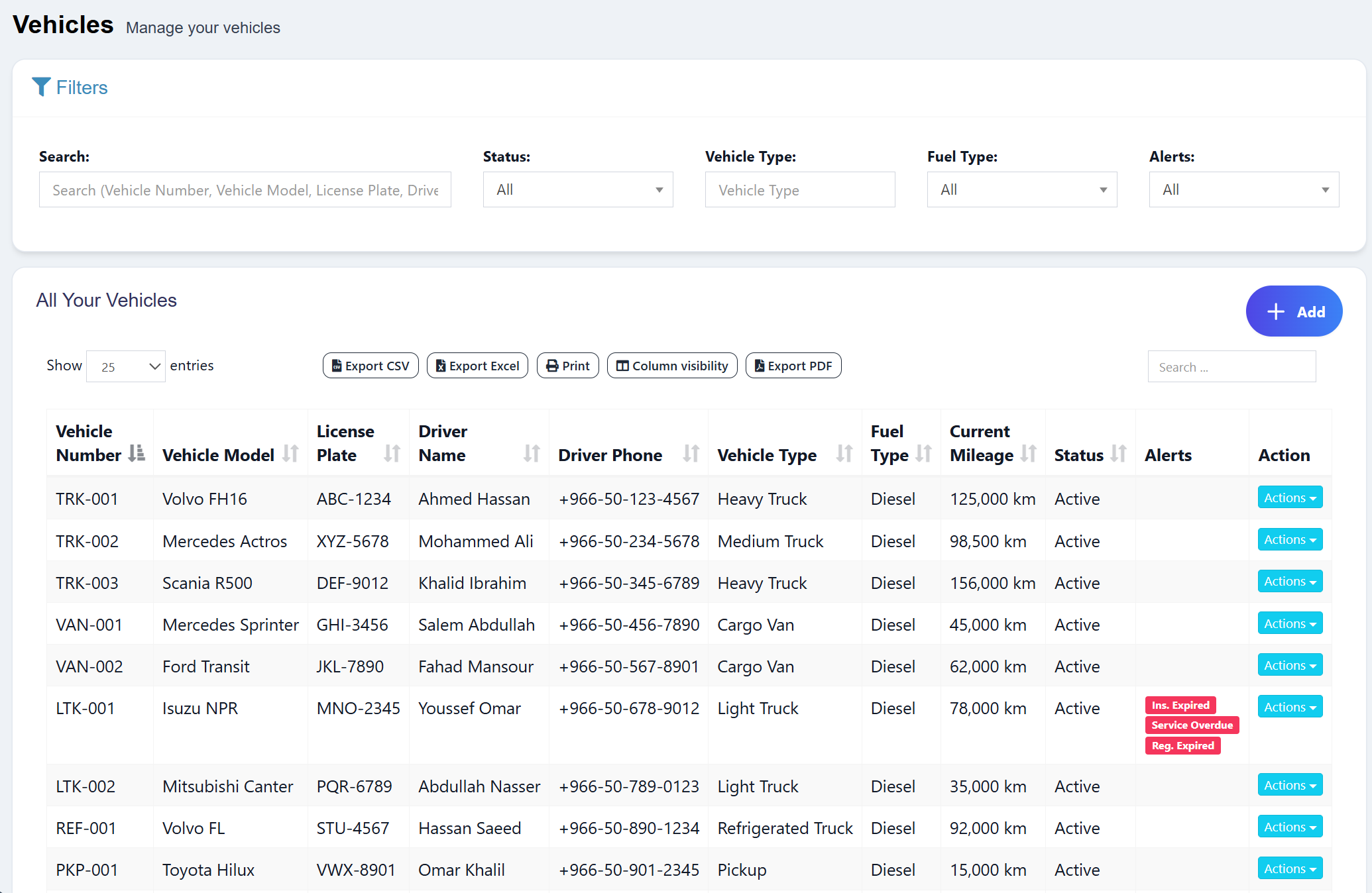
Vehicle Index Page
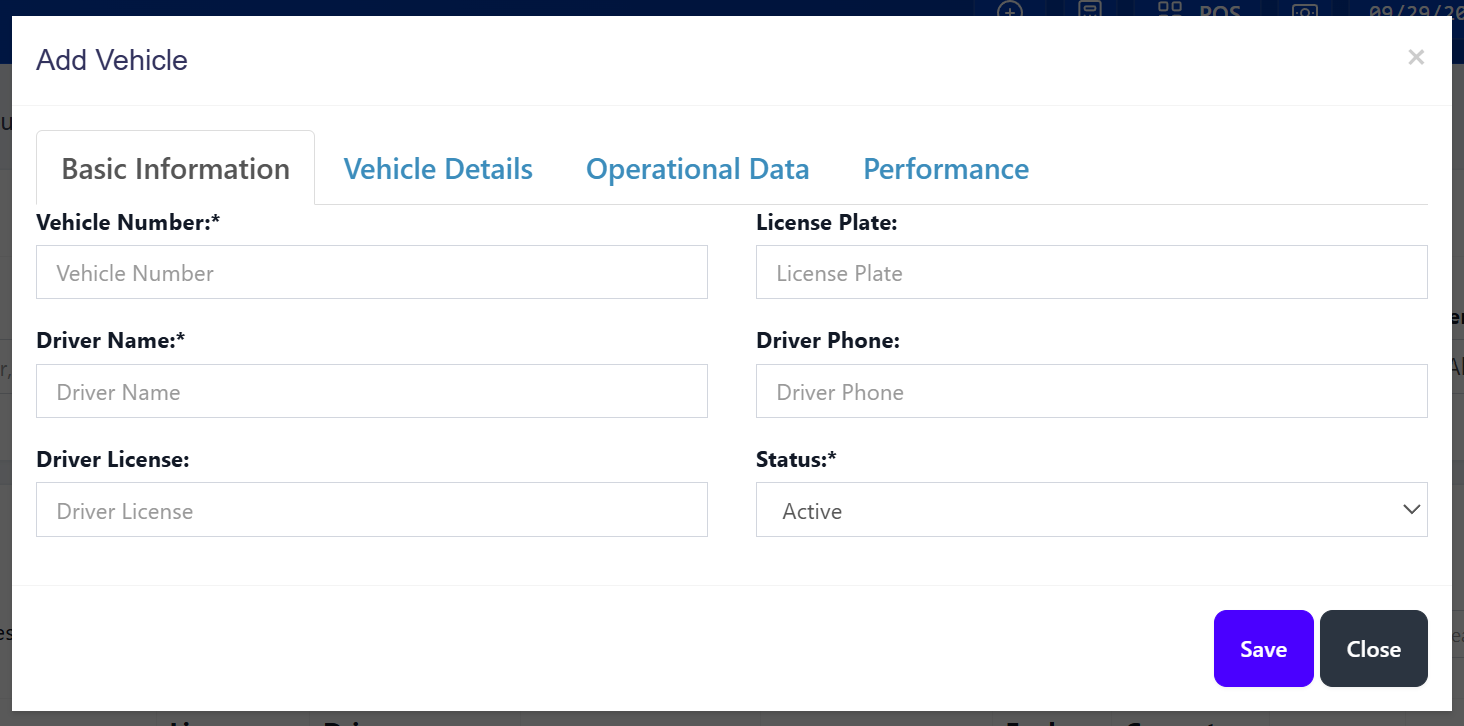
Vehicle Create Modal
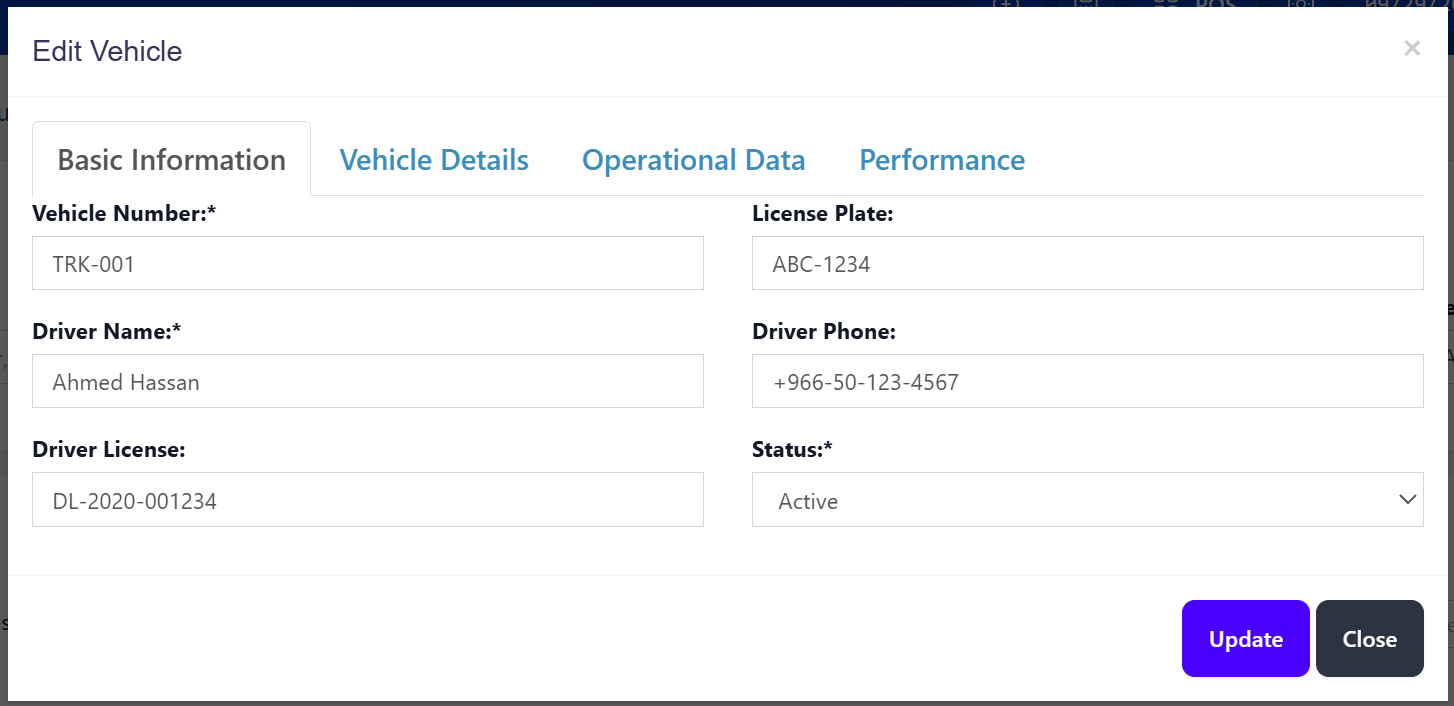
Vehicle Edit Modal
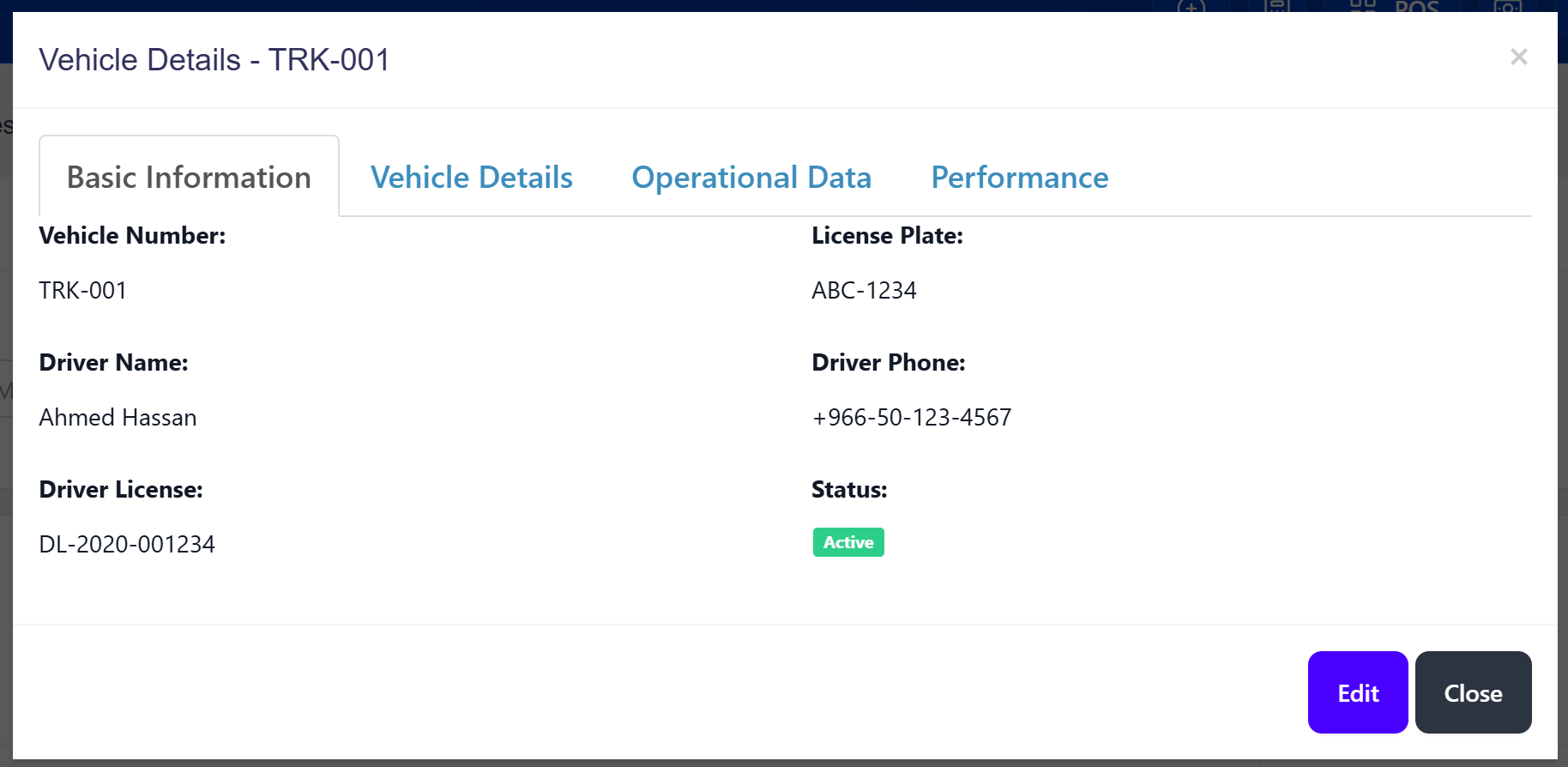
Vehicle View Modal
Vehicle Load Reports
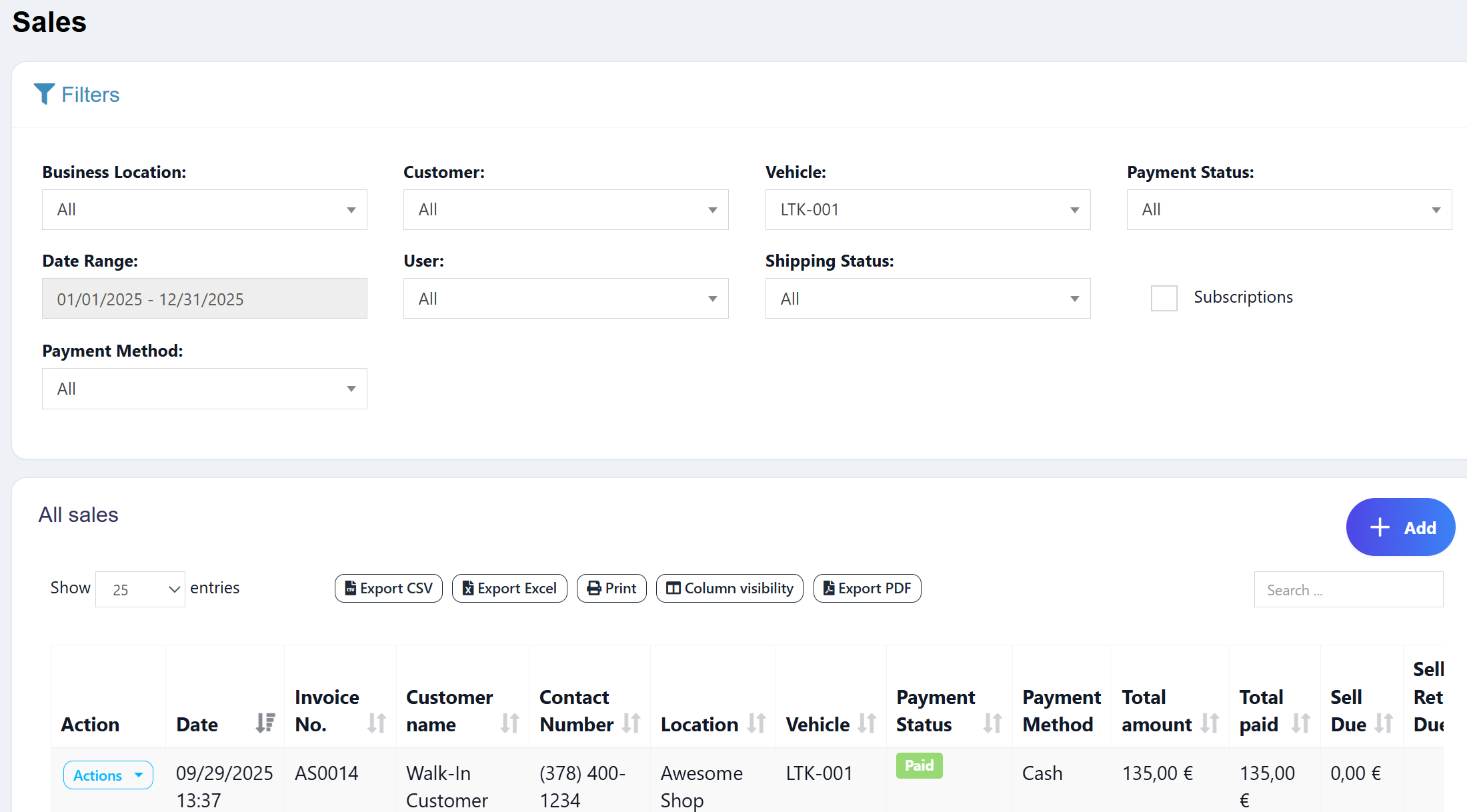
Sell list
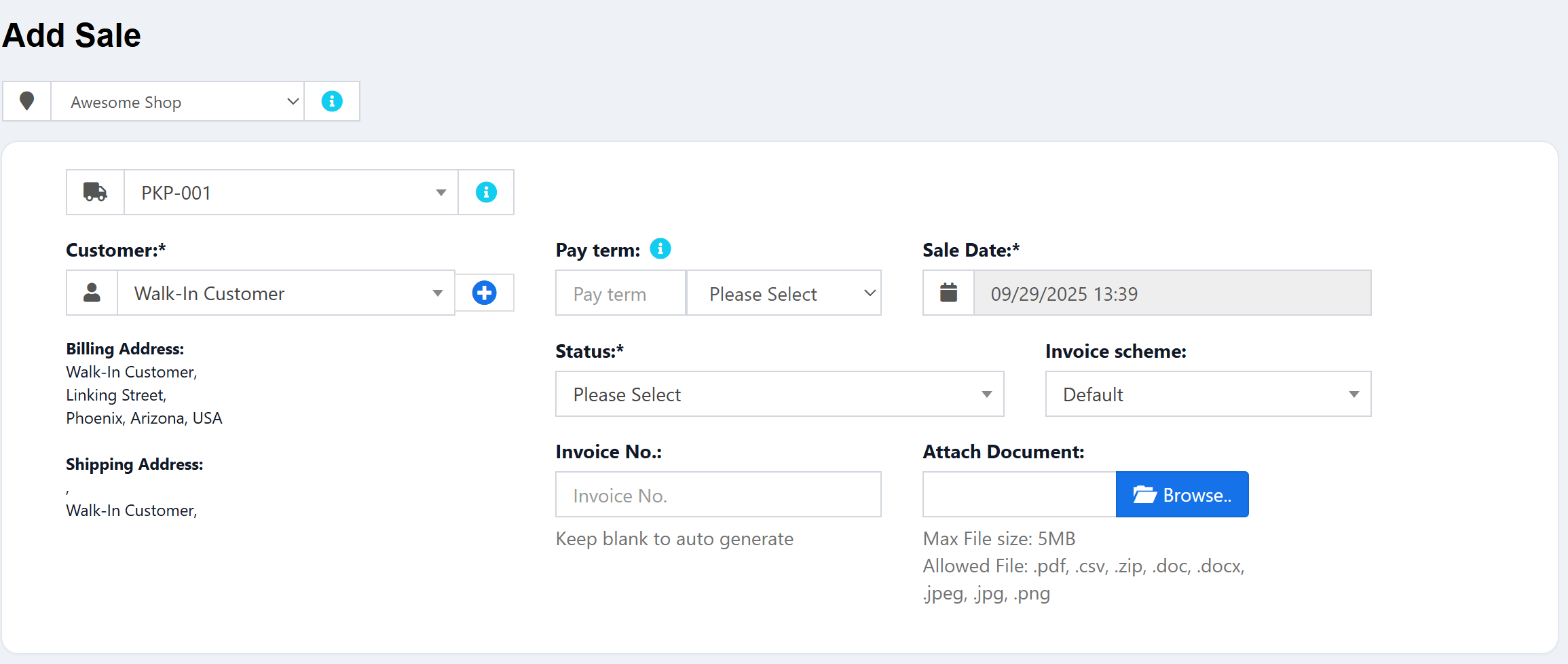
Sell create page
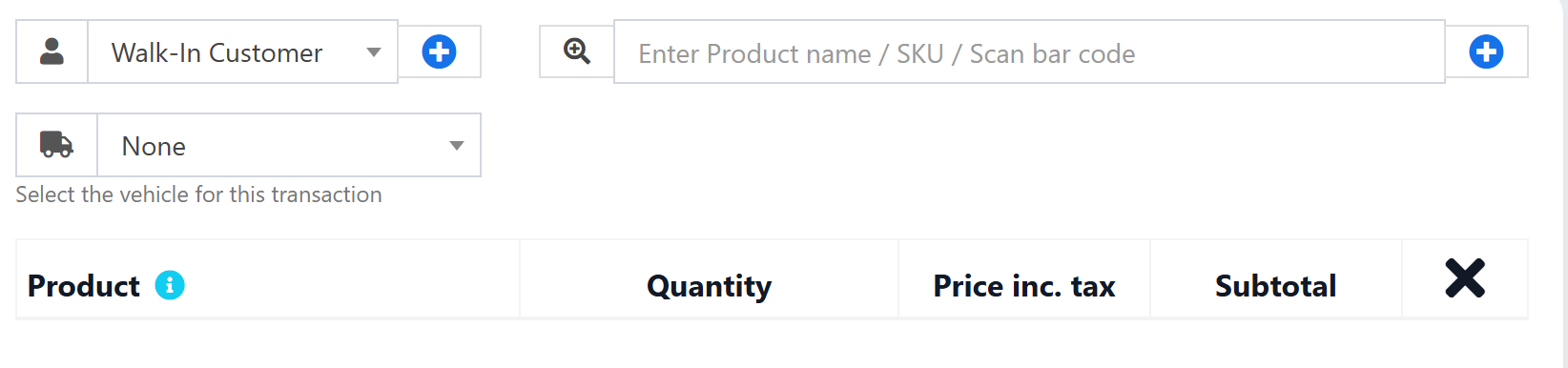
POS create page
Download Template for Phase 1
vehicle-management-system-all-files.zip
Database Setup
Single Comprehensive Migration
File: database/migrations/2025_09_29_180000_create_vehicle_management_system.php
<?php

use Illuminate\Database\Migrations\Migration;
use Illuminate\Database\Schema\Blueprint;
use Illuminate\Support\Facades\Schema;

return new class extends Migration
{
    /**
     * Run the migrations.
     *
     * @return void
     */
    public function up()
    {
        // Create vehicles table with all fields
        Schema::create('vehicles', function (Blueprint $table) {
            $table->id();
            $table->integer('business_id')->unsigned();
            $table->foreign('business_id')->references('id')->on('business')->onDelete('cascade');

            // Basic Information
            $table->string('vehicle_number')->unique();
            $table->string('driver_name');
            $table->string('vehicle_type');
            $table->enum('status', ['active', 'inactive'])->default('active');

            // Vehicle Details
            $table->string('vehicle_model')->nullable();
            $table->string('license_plate')->nullable();
            $table->string('vin_number')->nullable();
            $table->year('year')->nullable();
            $table->string('color')->nullable();
            $table->string('fuel_type')->nullable();
            $table->string('engine_capacity')->nullable();

            // Operational Data
            $table->decimal('current_mileage', 10, 2)->nullable();
            $table->date('purchase_date')->nullable();
            $table->decimal('purchase_price', 22, 4)->nullable();
            $table->date('insurance_expiry')->nullable();
            $table->date('registration_expiry')->nullable();
            $table->date('last_service_date')->nullable();
            $table->date('next_service_due')->nullable();

            // Performance Tracking
            $table->decimal('fuel_efficiency', 8, 2)->nullable()->comment('L/100km');
            $table->decimal('max_load_capacity', 10, 2)->nullable()->comment('in tons');
            $table->decimal('daily_rate', 22, 4)->nullable();
            $table->decimal('cost_per_km', 22, 4)->nullable();

            // Contact & Assignment
            $table->string('driver_phone')->nullable();
            $table->string('driver_license')->nullable();
            $table->string('assigned_route')->nullable();
            $table->string('home_location')->nullable();

            // System Fields
            $table->integer('created_by')->unsigned();
            $table->timestamps();
            $table->softDeletes();

            // Indexes
            $table->index('business_id');
            $table->index('status');
            $table->index('vehicle_type');
        });

        // Add vehicle_id to transactions table
        Schema::table('transactions', function (Blueprint $table) {
            $table->unsignedBigInteger('vehicle_id')->nullable()->after('business_id');
            $table->foreign('vehicle_id')
                  ->references('id')
                  ->on('vehicles')
                  ->onDelete('set null');
            $table->index('vehicle_id');
        });
    }

    /**
     * Reverse the migrations.
     *
     * @return void
     */
    public function down()
    {
        // Remove vehicle_id from transactions table
        Schema::table('transactions', function (Blueprint $table) {
            $table->dropForeign(['vehicle_id']);
            $table->dropIndex(['vehicle_id']);
            $table->dropColumn('vehicle_id');
        });

        // Drop vehicles table
        Schema::dropIfExists('vehicles');
    }
};
Run Migration:
# Run the migration
php artisan migrate

# Or run specific file
php artisan migrate --path=database/migrations/2025_09_29_180000_create_vehicle_management_system.php
Why Single Migration Approach:
✅ Simple: Everything in one file
✅ Complete: Full table structure from the start
✅ Clean: No dependency management needed
✅ Fast: One-step deployment
✅ Easy Rollback: Single rollback removes everything cleanly
What This Creates:
✅ Complete vehicles table with all 28 fields
✅ vehicle_id link to transactions table
✅ Proper indexes for performance
✅ Foreign key with SET NULL on delete
✅ Soft deletes support
✅ Business-level data isolation
Migration Management
To check migration status:
php artisan migrate:status | grep vehicle
To rollback the migration:
# Rollback the vehicle management system
php artisan migrate:rollback --step=1
To rollback and re-run:
php artisan migrate:refresh --step=1
Current Migration File:
2025_09_29_180000_create_vehicle_management_system.php- Complete vehicle management system
Model Implementation
File: app/Vehicle.php
<?php

namespace App;

use Illuminate\Database\Eloquent\Model;
use Illuminate\Database\Eloquent\SoftDeletes;

class Vehicle extends Model
{
    use SoftDeletes;

    protected $guarded = ['id'];

    protected $fillable = [
        'vehicle_number', 'driver_name', 'vehicle_type', 'status', 'business_id', 'created_by',
        // Vehicle Details
        'vehicle_model', 'license_plate', 'vin_number', 'year', 'color', 'fuel_type', 'engine_capacity',
        // Operational Data
        'current_mileage', 'purchase_date', 'purchase_price', 'insurance_expiry', 'registration_expiry',
        'last_service_date', 'next_service_due',
        // Performance Tracking
        'fuel_efficiency', 'max_load_capacity', 'daily_rate', 'cost_per_km',
        // Contact & Assignment
        'driver_phone', 'driver_license', 'assigned_route', 'home_location'
    ];

    protected $casts = [
        'purchase_date' => 'date',
        'insurance_expiry' => 'date',
        'registration_expiry' => 'date',
        'last_service_date' => 'date',
        'next_service_due' => 'date',
        'current_mileage' => 'decimal:2',
        'purchase_price' => 'decimal:2',
        'fuel_efficiency' => 'decimal:2',
        'max_load_capacity' => 'decimal:2',
        'daily_rate' => 'decimal:2',
        'cost_per_km' => 'decimal:2',
    ];

    /**
     * Get vehicles for dropdown
     */
    public static function forDropdown($business_id, $show_none = false)
    {
        $vehicles = Vehicle::where('business_id', $business_id)
            ->where('status', 'active')
            ->orderBy('vehicle_number', 'asc')
            ->pluck('vehicle_number', 'id');

        if ($show_none) {
            $vehicles->prepend(__('lang_v1.none'), '');
        }

        return $vehicles;
    }

    /**
     * Accessor: Display name
     */
    public function getDisplayNameAttribute()
    {
        return $this->vehicle_number . ' (' . $this->driver_name . ')';
    }

    /**
     * Accessor: Full details
     */
    public function getFullDetailsAttribute()
    {
        $details = $this->vehicle_number;
        if ($this->vehicle_model) {
            $details .= ' - ' . $this->vehicle_model;
        }
        if ($this->license_plate) {
            $details .= ' (' . $this->license_plate . ')';
        }
        return $details;
    }

    /**
     * Scopes for filtering
     */
    public function scopeActive($query)
    {
        return $query->where('status', 'active');
    }

    public function scopeByFuelType($query, $fuel_type)
    {
        return $query->where('fuel_type', $fuel_type);
    }

    public function scopeInsuranceExpiringSoon($query, $days = 30)
    {
        return $query->whereDate('insurance_expiry', '<=', now()->addDays($days))
                    ->whereDate('insurance_expiry', '>=', now());
    }
}
Controller Implementation
File: app/Http/Controllers/VehicleController.php
The controller includes:
✅ Index with DataTables
✅ Create/Store methods
✅ Edit/Update methods
✅ Delete (soft delete)
✅ Show (detail view)
✅ Reports method
✅ Excel export
See docs/Vehicle-Management-System/files/VehicleController.php for complete code.
View Templates
All view files are located in resources/views/vehicle/:
1. Index Page (index.blade.php)
Lists all vehicles in DataTable
Search and filter functionality
Action buttons (Edit, Delete, View)
2. Create Modal (create.blade.php)
Full vehicle form with all fields
Validation
Ajax submission
3. Edit Modal (edit.blade.php)
Pre-populated form
Update functionality
4. Show Page (show.blade.php)
Detailed vehicle information
Related transactions
5. Reports Page (reports.blade.php)
Vehicle analytics
Transaction history
Excel export
All view files are available in docs/Vehicle-Management-System/files/vehicle/
Transaction Integration
Sales (POS) Integration
1. Add vehicle selection to POS create form:
Edit resources/views/sale_pos/partials/pos_form.blade.php:
<!-- Vehicle Selection -->
<div class="col-md-4 col-sm-6">
    <div class="form-group">
        <label>@lang('lang_v1.vehicle'):</label>
        <div class="input-group">
            <span class="input-group-addon">
                <i class="fa fa-car"></i>
            </span>
            {!! Form::select('vehicle_id', $vehicles, null, [
                'class' => 'form-control select2',
                'id' => 'vehicle_id',
                'placeholder' => __('lang_v1.select_vehicle')
            ]) !!}
        </div>
    </div>
</div>
2. Add vehicle selection to POS edit form:
Edit resources/views/sale_pos/partials/pos_form_edit.blade.php:
<!-- Vehicle Selection Row -->
<div class="row">
    <div class="col-md-4 col-sm-6">
        <div class="form-group">
            <label>@lang('lang_v1.vehicle'):</label>
            <div class="input-group">
                <span class="input-group-addon">
                    <i class="fa fa-car"></i>
                </span>
                {!! Form::select('vehicle_id', $vehicles, $transaction->vehicle_id, [
                    'class' => 'form-control select2',
                    'id' => 'vehicle_id',
                    'placeholder' => __('lang_v1.select_vehicle')
                ]) !!}
            </div>
        </div>
    </div>
</div>
3. Update SellPosController:
In app/Http/Controllers/SellPosController.php:
// In create() method - add vehicles to view
$vehicles = \App\Vehicle::forDropdown($business_id, true);
return view('sale_pos.create')
    ->with(compact(..., 'vehicles'));

// In edit() method - add vehicles to view
$vehicles = \App\Vehicle::forDropdown($business_id, true);
return view('sale_pos.edit')
    ->with(compact(..., 'vehicles'));

// In store() method - save vehicle_id
$input['vehicle_id'] = $request->has('vehicle_id') && !empty($request->input('vehicle_id'))
    ? $request->input('vehicle_id') : null;

// In update() method - save vehicle_id
$input['vehicle_id'] = $request->has('vehicle_id') && !empty($request->input('vehicle_id'))
    ? $request->input('vehicle_id') : null;
4. Update TransactionUtil:
In app/Utils/TransactionUtil.php, add to updateSellTransaction() method:
$update_date = [
    // ... existing fields
    'vehicle_id' => ! empty($input['vehicle_id']) ? $input['vehicle_id'] : null,
    // ... rest of fields
];
Purchase Integration
1. Add vehicle selection to purchase create form:
Edit resources/views/purchase/partials/purchase_entry_row.blade.php or main purchase form:
<div class="col-sm-4">
    <div class="form-group">
        {!! Form::label('vehicle_id', __('lang_v1.vehicle') . ':') !!}
        <div class="input-group">
            <span class="input-group-addon">
                <i class="fa fa-car"></i>
            </span>
            {!! Form::select('vehicle_id', $vehicles, null, [
                'class' => 'form-control select2',
                'placeholder' => __('lang_v1.select_vehicle')
            ]) !!}
        </div>
    </div>
</div>
2. Update PurchaseController:
Follow similar pattern as SellPosController to add vehicles to create/edit methods.
Reporting System
Export Class
File: app/Exports/VehicleReportsExport.php
Handles Excel export of vehicle transaction reports using Laravel Excel.
Report Views
1. Main Reports Page:
Filter by date range
Filter by vehicle
Transaction type filter (sales/purchases/both)
Summary statistics
2. PDF Export: Partial template at resources/views/vehicle/partials/pdf_export.blade.php
Menu & Permissions
Add Menu Item
Edit app/Http/Middleware/AdminSidebarMenu.php:
// Vehicles menu (add before Settings Dropdown)
if (auth()->user()->can('vehicle.view')) {
    $menu->url(action([\App\Http\Controllers\VehicleController::class, 'index']),
        __('lang_v1.vehicles'), [
        'icon' => '<svg aria-hidden="true" class="tw-size-5 tw-shrink-0" xmlns="http://www.w3.org/2000/svg" viewBox="0 0 24 24" stroke-width="1.5" stroke="currentColor" fill="none">
            <path stroke="none" d="M0 0h24v24H0z" fill="none"></path>
            <path d="M7 17m-2 0a2 2 0 1 0 4 0a2 2 0 1 0 -4 0"></path>
            <path d="M17 17m-2 0a2 2 0 1 0 4 0a2 2 0 1 0 -4 0"></path>
            <path d="M5 17h-2v-11a1 1 0 0 1 1 -1h9v12m-4 0h6m-6 -9h8l2 3v6"></path>
        </svg>',
        'active' => request()->segment(1) == 'vehicles'
    ])->order(85);
}
Add Permissions
Run SQL or add to seeder:
INSERT INTO permissions (name, guard_name, created_at, updated_at) VALUES
('vehicle.view', 'web', NOW(), NOW()),
('vehicle.create', 'web', NOW(), NOW()),
('vehicle.update', 'web', NOW(), NOW()),
('vehicle.delete', 'web', NOW(), NOW());

-- Assign to Admin role (adjust role_id as needed)
INSERT INTO role_has_permissions (permission_id, role_id)
SELECT id, 1 FROM permissions WHERE name LIKE 'vehicle.%';
Add Routes
Edit routes/web.php:
Route::resource('vehicles', 'VehicleController');
Route::get('vehicles-reports', 'VehicleController@reports');
Route::get('vehicles-reports/export', 'VehicleController@exportReport');
Language Keys
Add to resources/lang/en/lang_v1.php:
// Vehicles
'vehicles' => 'Vehicles',
'vehicle' => 'Vehicle',
'select_vehicle' => 'Select Vehicle',
'vehicle_help' => 'Optional: Assign a vehicle to this transaction',
'manage_your_vehicles' => 'Manage your vehicles',
'all_your_vehicles' => 'All Your Vehicles',
'add_vehicle' => 'Add Vehicle',
'edit_vehicle' => 'Edit Vehicle',
'vehicle_details' => 'Vehicle Details',
'vehicle_number' => 'Vehicle Number',
'driver_name' => 'Driver Name',
'driver_phone' => 'Driver Phone',
'driver_license' => 'Driver License',
'vehicle_type' => 'Vehicle Type',
'vehicle_model' => 'Vehicle Model',
'license_plate' => 'License Plate',
'vin_number' => 'VIN Number',
'fuel_type' => 'Fuel Type',
'engine_capacity' => 'Engine Capacity',
'current_mileage' => 'Current Mileage',
'purchase_price' => 'Purchase Price',
'insurance_expiry' => 'Insurance Expiry',
'registration_expiry' => 'Registration Expiry',
'last_service_date' => 'Last Service Date',
'next_service_due' => 'Next Service Due',
'fuel_efficiency' => 'Fuel Efficiency (L/100km)',
'max_load_capacity' => 'Max Load Capacity',
'daily_rate' => 'Daily Rate',
'cost_per_km' => 'Cost Per KM',
'assigned_route' => 'Assigned Route',
'home_location' => 'Home Location',
'vehicle_added_success' => 'Vehicle added successfully',
'vehicle_updated_success' => 'Vehicle updated successfully',
'vehicle_deleted_success' => 'Vehicle deleted successfully',
'vehicle_reports' => 'Vehicle Reports',
'vehicle_transactions' => 'Vehicle Transactions',
'no_vehicle_assigned' => 'No Vehicle Assigned',
Complete File Package
All implementation files are available in the files directory:
Structure:
docs/Vehicle-Management-System/files/
├── Vehicle.php                          # Model
├── VehicleController.php                # Controller
├── VehicleReportsExport.php            # Excel Export
├── migrations/
│   ├── 2025_09_29_180000_create_vehicle_management_system.php
│   └── create_vehicle_management_system.php  # Alternative version
└── vehicle/                             # Views
    ├── index.blade.php
    ├── create.blade.php
    ├── edit.blade.php
    ├── show.blade.php
    ├── reports.blade.php
    └── partials/
        └── pdf_export.blade.php
Installation Steps
Copy Model:
cp files/Vehicle.php app/Copy Controller:
cp files/VehicleController.php app/Http/Controllers/Copy Export:
cp files/VehicleReportsExport.php app/Exports/Copy Views:
cp -r files/vehicle resources/views/Copy Migration:
cp files/migrations/2025_09_29_180000_create_vehicle_management_system.php database/migrations/Run Migration:
php artisan migrateAdd Routes, Menu, Permissions (see sections above)
Features Summary
✅ Complete CRUD Operations
Create vehicles with comprehensive details
Edit existing vehicles
View individual vehicle details
Soft delete vehicles
Status management (active/inactive)
✅ Transaction Integration
Assign vehicles to sales transactions
Assign vehicles to purchase transactions
Track vehicle usage across all transactions
Filter transactions by vehicle
✅ Advanced Reporting
Vehicle transaction history
Sales and purchase summaries by vehicle
Date range filtering
Excel export functionality
Performance metrics
✅ Business Features
Multi-business support
Permission-based access control
Business-level data isolation
Soft deletes for data integrity
Audit trail (created_by tracking)
✅ User Experience
DataTables with server-side processing
Ajax-powered modals
Select2 dropdowns
Responsive design
Consistent with Ultimate POS UI
Testing
Sample Data
INSERT INTO vehicles (vehicle_number, driver_name, vehicle_type, vehicle_model, license_plate, status, business_id, created_by, created_at, updated_at) VALUES
('TRK-001', 'John Smith', 'Truck', 'Ford F-150', 'ABC-1234', 'active', 1, 1, NOW(), NOW()),
('VAN-002', 'Mike Johnson', 'Van', 'Mercedes Sprinter', 'XYZ-5678', 'active', 1, 1, NOW(), NOW()),
('TRK-003', 'David Wilson', 'Heavy Truck', 'Volvo FH16', 'DEF-9012', 'active', 1, 1, NOW(), NOW());
Test Checklist
Create new vehicle
Edit vehicle details
Delete vehicle (soft delete)
View vehicle details
Assign vehicle to sale
Assign vehicle to purchase
Filter by vehicle in reports
Export vehicle report to Excel
Check permissions (view/create/edit/delete)
Test multi-business isolation
Troubleshooting
Common Issues
1. Vehicle not showing in dropdown:
Check vehicle status is 'active'
Verify business_id matches current business
Clear cache:
php artisan cache:clear
2. Migration errors:
Ensure transactions table exists first
Check foreign key constraints
Verify business table exists for foreign key reference
3. Permission denied:
Verify permissions are seeded
Check role assignments
Clear permission cache:
php artisan permission:cache-reset
4. Table already exists error: If you get "table vehicles already exists" error:
# Check current status
php artisan migrate:status | grep vehicle

# If needed, rollback and start fresh
php artisan migrate:rollback --step=1
php artisan migrate
5. Foreign key constraint errors:
# Make sure transactions table exists
mysql -u username -p database_name -e "SHOW TABLES LIKE 'transactions';"

# If vehicle_id column exists but causing issues
mysql -u username -p database_name -e "SHOW COLUMNS FROM transactions WHERE Field='vehicle_id';"

# Manual cleanup if needed (use with caution)
mysql -u username -p database_name -e "ALTER TABLE transactions DROP FOREIGN KEY transactions_vehicle_id_foreign;"
mysql -u username -p database_name -e "ALTER TABLE transactions DROP COLUMN vehicle_id;"
6. Migration partially applied: If migration fails midway:
# Check what exists
php artisan migrate:status | grep vehicle
mysql -u username -p database_name -e "SHOW TABLES LIKE 'vehicles';"

# Force rollback
php artisan migrate:rollback --step=1 --force

# Or manual cleanup
mysql -u username -p database_name -e "DROP TABLE IF EXISTS vehicles;"
mysql -u username -p database_name -e "ALTER TABLE transactions DROP COLUMN IF EXISTS vehicle_id;"

# Delete migration record
mysql -u username -p database_name -e "DELETE FROM migrations WHERE migration LIKE '%vehicle%';"

# Run again
php artisan migrate
Compatible with: Ultimate POS 6.x+ Laravel Version: 9.x / 10.x
Recommended Comments