








Adding Multiple Suppliers to Products

By
· 594 views
Adding Multiple Suppliers to Products - Complete Implementation Guide
Overview
This guide will walk you through the complete process of adding multiple suppliers functionality to your Ultimate POS products. This feature allows you to:
Assign multiple suppliers to products during creation and editing
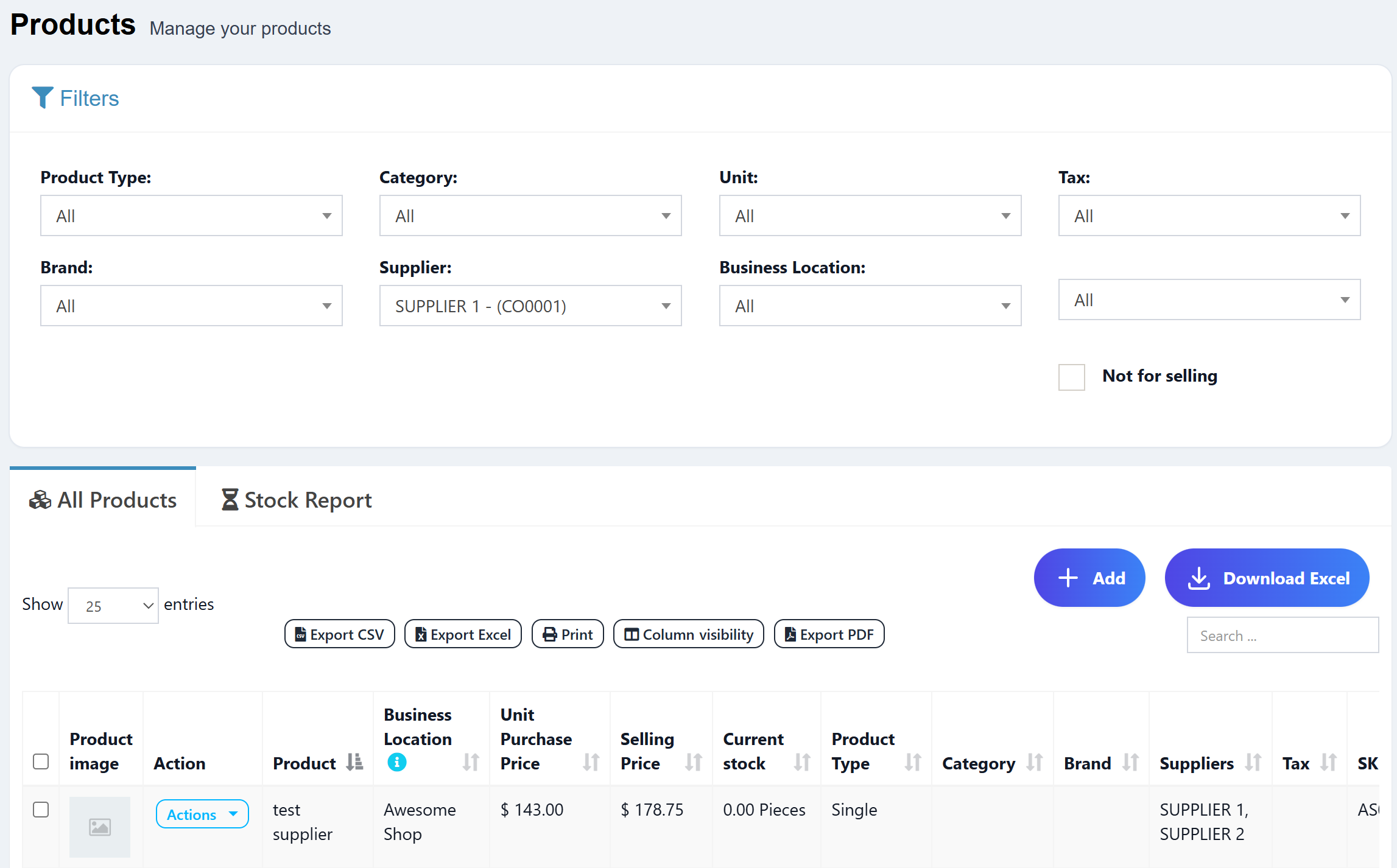
Filter products by supplier in the products list
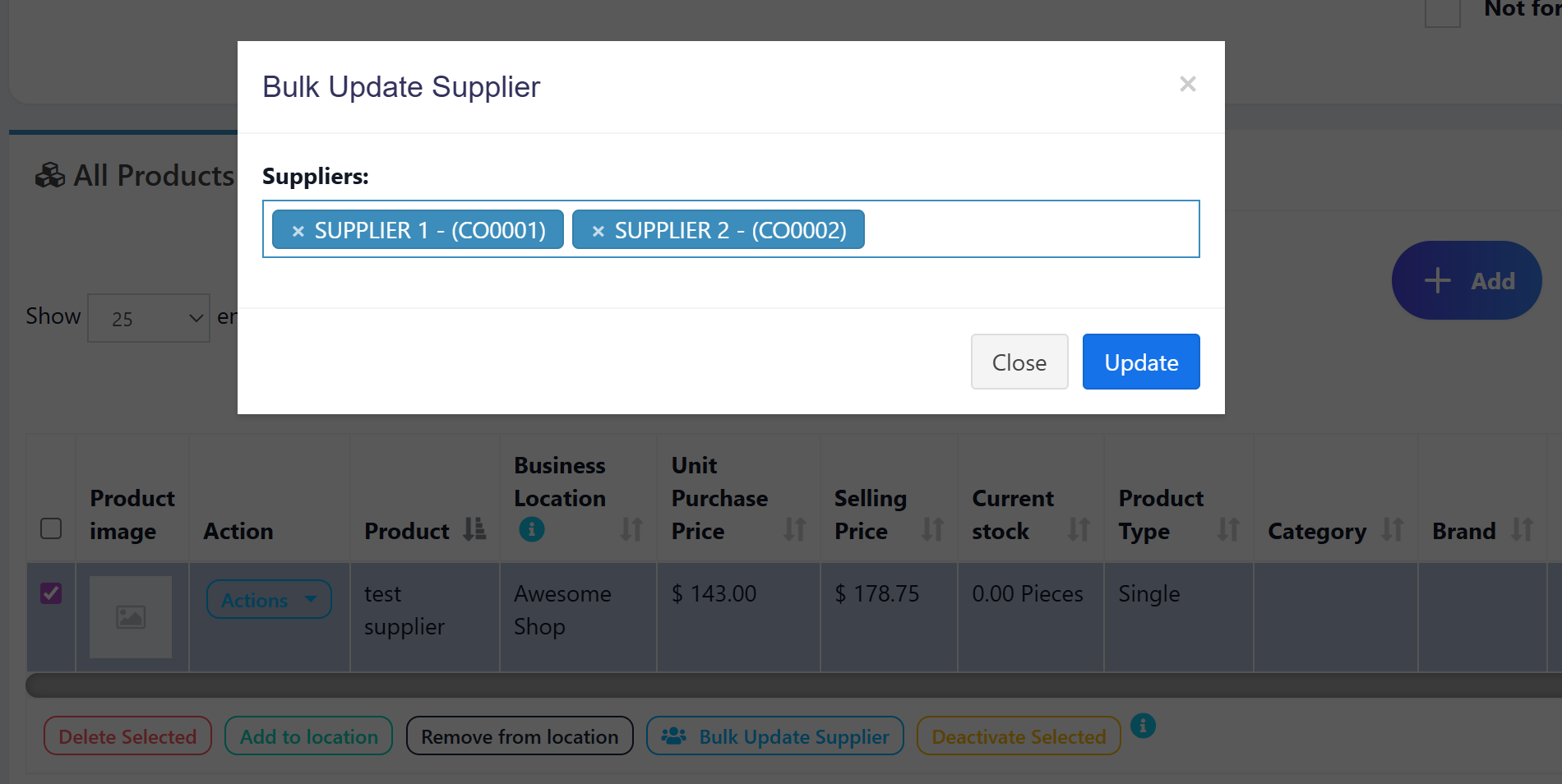
Bulk update suppliers for multiple products
View all suppliers information in product details
Use many-to-many relationship between products and suppliers
Download Complete Files
Download All Updated Files
adding-supplier-to-products.zip
Step 1: Database Structure
Migration and Direct SQL
Ultimate POS already has a contacts table that stores suppliers. For multiple suppliers per product, we need to create a pivot table (many-to-many relationship).
Create Migration:
php artisan make:migration create_product_supplier_table
Migration Content:
<?php

use Illuminate\Database\Migrations\Migration;
use Illuminate\Database\Schema\Blueprint;
use Illuminate\Support\Facades\Schema;

return new class extends Migration
{
    public function up()
    {
        Schema::create('product_supplier', function (Blueprint $table) {
            $table->id();
            $table->unsignedInteger('product_id');
            $table->unsignedInteger('supplier_id');
            $table->timestamps();

            // Foreign keys
            $table->foreign('product_id')->references('id')->on('products')->onDelete('cascade');
            $table->foreign('supplier_id')->references('id')->on('contacts')->onDelete('cascade');

            // Prevent duplicate entries
            $table->unique(['product_id', 'supplier_id']);

            // Indexes for better performance
            $table->index('product_id');
            $table->index('supplier_id');
        });
    }

    public function down()
    {
        Schema::dropIfExists('product_supplier');
    }
};
Direct SQL (Alternative):
-- Create pivot table for product-supplier relationship
CREATE TABLE `product_supplier` (
  `id` BIGINT UNSIGNED NOT NULL AUTO_INCREMENT PRIMARY KEY,
  `product_id` INT UNSIGNED NOT NULL,
  `supplier_id` INT UNSIGNED NOT NULL,
  `created_at` TIMESTAMP NULL,
  `updated_at` TIMESTAMP NULL,

  -- Foreign keys
  CONSTRAINT `fk_product_supplier_product_id`
    FOREIGN KEY (`product_id`) REFERENCES `products`(`id`) ON DELETE CASCADE,
  CONSTRAINT `fk_product_supplier_supplier_id`
    FOREIGN KEY (`supplier_id`) REFERENCES `contacts`(`id`) ON DELETE CASCADE,

  -- Unique constraint to prevent duplicates
  UNIQUE KEY `unique_product_supplier` (`product_id`, `supplier_id`),

  -- Indexes for performance
  INDEX `idx_product_supplier_product_id` (`product_id`),
  INDEX `idx_product_supplier_supplier_id` (`supplier_id`)
) ENGINE=InnoDB DEFAULT CHARSET=utf8mb4 COLLATE=utf8mb4_unicode_ci;
Run Migration:
php artisan migrate
Note: This creates a many-to-many relationship allowing each product to have multiple suppliers and each supplier to supply multiple products.
Step 2: Model Updates
Update Product Model
File: app/Product.php
Add relationship method for many-to-many relationship:
/**
 * Get the suppliers for the product (many-to-many).
 */
public function suppliers()
{
    return $this->belongsToMany(
        \App\Contact::class,
        'product_supplier',
        'product_id',
        'supplier_id'
    )->withTimestamps();
}
File: app/Contact.php
Add relationship method for many-to-many relationship:
/**
 * Get products supplied by this supplier (many-to-many)
 */
public function products()
{
    return $this->belongsToMany(
        \App\Product::class,
        'product_supplier',
        'supplier_id',
        'product_id'
    )->withTimestamps();
}

/**
 * Get products supplied by this supplier with stock enabled
 */
public function stockProducts()
{
    return $this->belongsToMany(
        \App\Product::class,
        'product_supplier',
        'supplier_id',
        'product_id'
    )->where('products.enable_stock', 1)
     ->withTimestamps();
}
Important Notes:
The
belongsToManyrelationship requires the pivot table name (product_supplier)Use
sync()method to attach/detach suppliers in controllersThe
withTimestamps()method ensures the pivot table timestamps are maintained
Step 3: Controller Updates
ProductController Changes
File: app/Http/Controllers/ProductController.php
3.1 Update index() method
Add suppliers to eager loading (around line 77):
$query = Product::with(['media', 'suppliers'])
Add supplier filter to query (around line 162):
$supplier_id = request()->get('supplier_id', null);
if (!empty($supplier_id)) {
    $products->whereHas('suppliers', function ($query) use ($supplier_id) {
        $query->where('contacts.id', $supplier_id);
    });
}
Add suppliers column to DataTables (after selling_price column):
->addColumn('suppliers', function ($row) {
    $suppliers = $row->suppliers->pluck('name')->toArray();
    return implode(', ', $suppliers);
})
Add suppliers dropdown for view (around line 334):
$suppliers = \App\Contact::suppliersDropdown($business_id);
Update compact statement to include suppliers:
return view('product.index')
    ->with(compact(
        'rack_enabled',
        'categories',
        'brands',
        'units',
        'taxes',
        'business_locations',
        'show_manufacturing_data',
        'pos_module_data',
        'is_woocommerce',
        'is_admin',
        'suppliers'
    ));
3.2 Update create() method
Add suppliers dropdown (around line 150):
$suppliers = \App\Contact::suppliersDropdown($business_id);
Update compact statement:
return view('product.create')
    ->with(compact('categories', 'brands', 'units', 'taxes', 'barcode_types',
    'default_profit_percent', 'tax_attributes', 'barcode_default', 'business_locations',
    'duplicate_product', 'sub_categories', 'rack_details', 'selling_price_group_count',
    'module_form_parts', 'product_types', 'common_settings', 'warranties',
    'pos_module_data', 'suppliers'));
3.3 Update store() method
Add supplier sync after product creation (after product locations sync, around line 645):
// Sync product suppliers
$supplier_ids = $request->input('supplier_ids', []);
if (!empty($supplier_ids)) {
    $product->suppliers()->sync($supplier_ids);
}
3.4 Update edit() method
Add suppliers dropdown (around line 350):
$suppliers = \App\Contact::suppliersDropdown($business_id);
Update compact statement:
return view('product.edit')
    ->with(compact('categories', 'brands', 'units', 'sub_units', 'taxes', 'tax_attributes',
    'barcode_types', 'product', 'sub_categories', 'default_profit_percent', 'business_locations',
    'rack_details', 'selling_price_group_count', 'module_form_parts', 'product_types',
    'common_settings', 'warranties', 'pos_module_data', 'alert_quantity', 'suppliers'));
3.5 Update update() method
Add supplier sync after product update (after product locations sync, around line 820):
// Sync product suppliers
$supplier_ids = $request->input('supplier_ids', []);
$product->suppliers()->sync($supplier_ids);
3.6 Update view() method
Add suppliers to with array (around line 920):
$product = Product::where('business_id', $business_id)
    ->with(['brand', 'unit', 'category', 'sub_category', 'product_tax', 'variations', 'variations.product_variation', 'variations.group_prices', 'variations.media', 'product_locations', 'warranty', 'media', 'suppliers'])
    ->findOrFail($id);
3.7 Add bulk supplier update method
public function bulkUpdateSupplier(Request $request)
{
    if (!auth()->user()->can('product.update')) {
        abort(403, 'Unauthorized action.');
    }

    try {
        $selected_products = $request->input('selected_products');
        $supplier_ids = $request->input('supplier_ids', []);
        $business_id = $request->session()->get('user.business_id');

        if (empty($selected_products)) {
            $output = [
                'success' => 0,
                'msg' => __('lang_v1.no_products_selected')
            ];
            return $output;
        }

        $product_ids = explode(',', $selected_products);

        DB::beginTransaction();

        // Get products and sync suppliers for each
        $products = Product::where('business_id', $business_id)
            ->whereIn('id', $product_ids)
            ->get();

        foreach ($products as $product) {
            $product->suppliers()->sync($supplier_ids);
        }

        DB::commit();

        $output = [
            'success' => 1,
            'msg' => __('lang_v1.supplier_updated_success')
        ];
    } catch (\Exception $e) {
        DB::rollBack();
        \Log::emergency("File:" . $e->getFile() . "Line:" . $e->getLine() . "Message:" . $e->getMessage());

        $output = [
            'success' => 0,
            'msg' => __('messages.something_went_wrong')
        ];
    }

    return $output;
}
3.8 Update other methods
quickAdd() method (around line 1500):
Add suppliers dropdown:
$suppliers = \App\Contact::suppliersDropdown($business_id, false);
Update the compact statement to include suppliers:
return view('product.partials.quick_add_product')
    ->with(compact('categories', 'brands', 'units', 'taxes', 'barcode_types', 'default_profit_percent', 'tax_attributes', 'product_name', 'locations', 'product_for', 'enable_expiry', 'enable_lot', 'module_form_parts', 'business_locations', 'common_settings', 'warranties', 'suppliers'));
saveQuickProduct() method:
The supplier_ids handling is done via sync relationship, NOT through form_fields. Add this code after syncing product_locations (around line 1610):
//Add product suppliers
$supplier_ids = $request->input('supplier_ids');
if (!empty($supplier_ids)) {
    $product->suppliers()->sync($supplier_ids);
}
bulkEdit() and bulkUpdate() methods:
// Add supplier handling as shown in previous implementation guide
Step 4: Routes
File: routes/web.php
Add the bulk supplier update route:
Route::post('/products/bulk-update-supplier', [ProductController::class, 'bulkUpdateSupplier'])
    ->name('products.bulk-update-supplier');
Step 5: View Updates
5.1 Product Index Page
File: resources/views/product/index.blade.php
Add supplier filter (after brand filter around line 90):
<div class="col-md-3">
    <div class="form-group">
        {!! Form::label('supplier_id', __('contact.supplier') . ':') !!}
        {!! Form::select('supplier_id', $suppliers ?? [], null, [
            'class' => 'form-control select2',
            'style' => 'width:100%',
            'id' => 'product_list_filter_supplier_id',
            'placeholder' => __('lang_v1.all'),
        ]) !!}
    </div>
</div>
Update JavaScript DataTable configuration:
Add to ajax data function:
d.supplier_id = $('#product_list_filter_supplier_id').val();
Add to columns array (after brand column):
{
    data: 'suppliers',
    name: 'suppliers',
    orderable: false,
    searchable: false
},
Update change event listener:
$(document).on('change',
    '#product_list_filter_type, #product_list_filter_category_id, #product_list_filter_brand_id, #product_list_filter_supplier_id, #product_list_filter_unit_id, #product_list_filter_tax_id, #location_id, #active_state, #repair_model_id',
    function() {
        // existing code
    });
Add bulk supplier modal:
<!-- Bulk Supplier Update Modal -->
<div class="modal fade" id="bulk_supplier_modal" tabindex="-1" role="dialog">
<div class="modal-dialog" role="document">
<div class="modal-content">
<div class="modal-header">
<button type="button" class="close" data-dismiss="modal">
<span>×</span>
</button>
<h4 class="modal-title">@lang('lang_v1.bulk_update_supplier')</h4>
</div>
<form id="bulk_supplier_form" method="POST" action="{{ route('products.bulk-update-supplier') }}">
@csrf
<div class="modal-body">
<div class="form-group">
<label for="bulk_supplier_id">@lang('contact.supplier'):</label>
<select name="supplier_id" id="bulk_supplier_id" class="form-control select2" style="width: 100%;">
<option value="">@lang('lang_v1.none')</option>
@if(isset($suppliers))
@foreach($suppliers as $id => $name)
@if($id != '')
<option value="{{ $id }}">{{ $name }}</option>
@endif
@endforeach
@endif
</select>
</div>
<input type="hidden" name="selected_products" id="bulk_selected_products">
</div>
<div class="modal-footer">
<button type="button" class="btn btn-default" data-dismiss="modal">@lang('messages.close')</button>
<button type="submit" class="btn btn-primary">@lang('messages.update')</button>
</div>
</form>
</div>
</div>
</div>
Add bulk supplier JavaScript:
// Bulk supplier update functionality
$(document).on('click', '.bulk-update-supplier', function(e) {
    e.preventDefault();
    var selected_rows = getSelectedRows();

    if (selected_rows.length > 0) {
        $('#bulk_selected_products').val(selected_rows);
        $('#bulk_supplier_modal').modal('show');

        $('#bulk_supplier_id').select2({
            dropdownParent: $('#bulk_supplier_modal')
        });
    } else {
        swal('@lang("lang_v1.no_row_selected")');
    }
});

$(document).on('submit', '#bulk_supplier_form', function(e) {
    e.preventDefault();
    var form = $(this);
    var data = form.serialize();

    $.ajax({
        method: 'POST',
        url: form.attr('action'),
        dataType: 'json',
        data: data,
        beforeSend: function(xhr) {
            form.find('button[type="submit"]').attr('disabled', true);
        },
        success: function(result) {
            if (result.success == 1) {
                $('#bulk_supplier_modal').modal('hide');
                toastr.success(result.msg);
                product_table.ajax.reload();
            } else {
                toastr.error(result.msg);
            }
            form.find('button[type="submit"]').attr('disabled', false);
        },
        error: function(xhr) {
            toastr.error('@lang("messages.something_went_wrong")');
            form.find('button[type="submit"]').attr('disabled', false);
        }
    });
});
5.2 Product Table
File: resources/views/product/partials/product_list.blade.php
Add supplier column header (after brand):
<th>@lang('lang_v1.suppliers')</th>
Add bulk supplier button (in tfoot after existing buttons):
<button type="button" class="tw-dw-btn tw-dw-btn-xs tw-dw-btn-outline tw-dw-btn-info bulk-update-supplier">
    <i class="fa fa-users"></i> @lang('lang_v1.bulk_update_supplier')
</button>
5.3 Product Forms
Create Form (resources/views/product/create.blade.php):
Add after brand field (around line 87):
<div class="col-sm-4">
    <div class="form-group">
        {!! Form::label('supplier_ids', __('lang_v1.suppliers') . ':') !!}
        <div class="input-group">
            {!! Form::select('supplier_ids[]', $suppliers, !empty($duplicate_product) ? $duplicate_product->suppliers->pluck('id')->toArray() : null, ['class' => 'form-control select2', 'multiple', 'id' => 'supplier_ids']); !!}
            <span class="input-group-btn">
                <button type="button" @if(!auth()->user()->can('supplier.create')) disabled @endif class="btn btn-default bg-white btn-flat quick_add_supplier_btn" title="@lang('contact.add_supplier')"><i class="fa fa-plus-circle text-primary fa-lg"></i></button>
            </span>
        </div>
    </div>
</div>
Edit Form (resources/views/product/edit.blade.php):
Add after brand field (around line 98):
<div class="col-sm-4">
    <div class="form-group">
        {!! Form::label('supplier_ids', __('lang_v1.suppliers') . ':') !!}
        <div class="input-group">
            {!! Form::select('supplier_ids[]', $suppliers, $product->suppliers->pluck('id')->toArray(), ['class' => 'form-control select2', 'multiple', 'id' => 'supplier_ids']); !!}
            <span class="input-group-btn">
                <button type="button" @if(!auth()->user()->can('supplier.create')) disabled @endif class="btn btn-default bg-white btn-flat quick_add_supplier_btn" title="@lang('contact.add_supplier')"><i class="fa fa-plus-circle text-primary fa-lg"></i></button>
            </span>
        </div>
    </div>
</div>
Note: The edit form pre-populates with the product's current suppliers using $product->suppliers->pluck('id')->toArray()
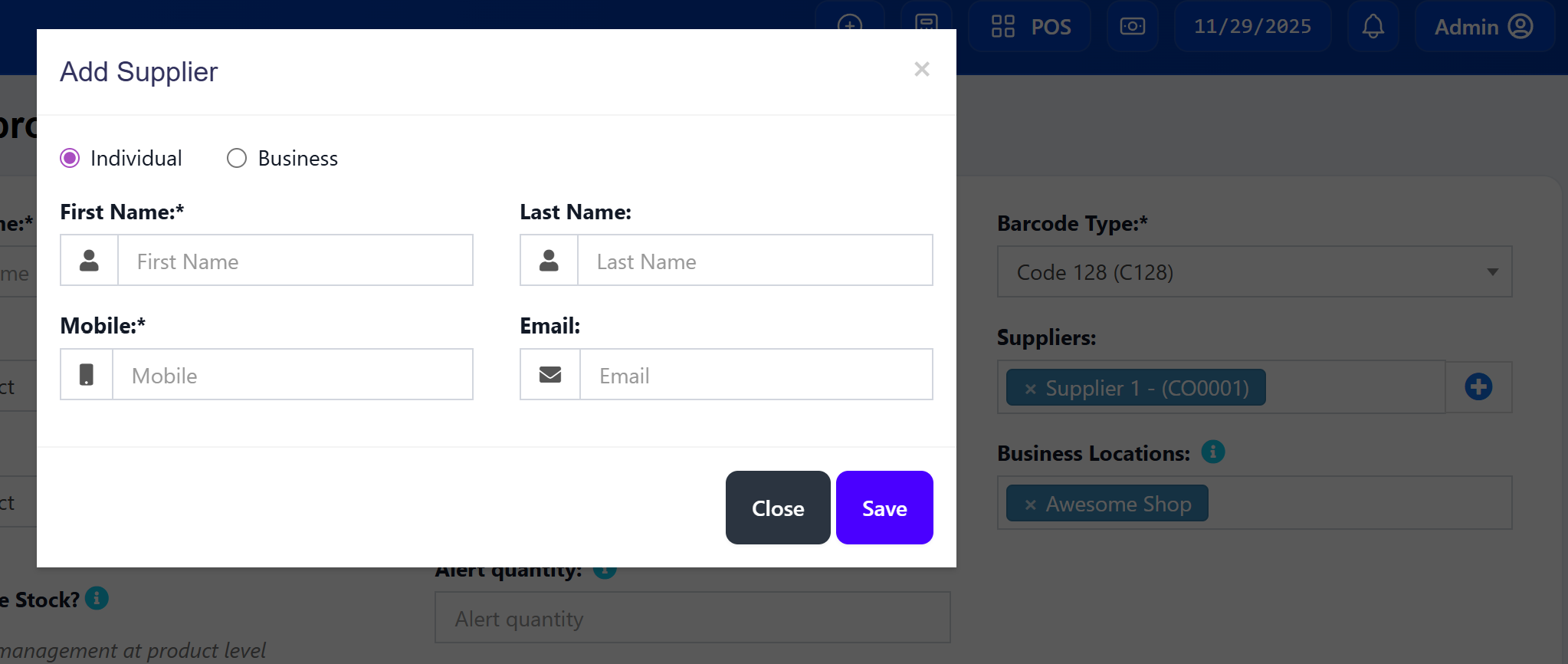
5.4 Quick Add Supplier Modal (Simplified Form)
This section implements a simplified quick add supplier modal similar to the purchase page, with only essential fields: Supplier Name (or Business Name) and Mobile Number, plus Individual/Business toggle.
File: resources/views/product/partials/quick_add_supplier_modal.blade.php (Create this new file)
<!-- Quick Add Supplier Modal for Product Pages -->
<div class="modal fade" id="quick_add_supplier_modal" tabindex="-1" role="dialog" aria-labelledby="quickAddSupplierModalLabel">
<div class="modal-dialog" role="document">
<div class="modal-content">
{!! Form::open(['url' => action([\App\Http\Controllers\ContactController::class, 'store']), 'method' => 'post', 'id' => 'quick_add_supplier_form']) !!}
<div class="modal-header">
<button type="button" class="close" data-dismiss="modal" aria-label="Close">
<span aria-hidden="true">×</span>
</button>
<h4 class="modal-title" id="quickAddSupplierModalLabel">@lang('contact.add_supplier')</h4>
</div>
<div class="modal-body">
{!! Form::hidden('type', 'supplier') !!}
<div class="row">
<!-- Individual / Business Toggle -->
<div class="col-md-12" style="margin-bottom: 15px;">
<label class="radio-inline">
<input type="radio" name="supplier_type_radio" class="supplier_type_radio" value="individual" checked>
@lang('lang_v1.individual')
</label>
<label class="radio-inline">
<input type="radio" name="supplier_type_radio" class="supplier_type_radio" value="business">
@lang('business.business')
</label>
</div>
<div class="clearfix"></div>
<!-- Individual Fields -->
<div class="col-md-6 supplier_individual_fields">
<div class="form-group">
{!! Form::label('first_name', __('business.first_name') . ':*') !!}
<div class="input-group">
<span class="input-group-addon">
<i class="fa fa-user"></i>
</span>
{!! Form::text('first_name', null, ['class' => 'form-control', 'placeholder' => __('business.first_name'), 'id' => 'supplier_first_name']); !!}
</div>
</div>
</div>
<div class="col-md-6 supplier_individual_fields">
<div class="form-group">
{!! Form::label('last_name', __('business.last_name') . ':') !!}
<div class="input-group">
<span class="input-group-addon">
<i class="fa fa-user"></i>
</span>
{!! Form::text('last_name', null, ['class' => 'form-control', 'placeholder' => __('business.last_name'), 'id' => 'supplier_last_name']); !!}
</div>
</div>
</div>
<!-- Business Fields (Hidden by default) -->
<div class="col-md-12 supplier_business_fields" style="display: none;">
<div class="form-group">
{!! Form::label('supplier_business_name', __('business.business_name') . ':*') !!}
<div class="input-group">
<span class="input-group-addon">
<i class="fa fa-briefcase"></i>
</span>
{!! Form::text('supplier_business_name', null, ['class' => 'form-control', 'placeholder' => __('business.business_name'), 'id' => 'supplier_business_name_input']); !!}
</div>
</div>
</div>
<!-- Mobile Number (Always visible) -->
<div class="col-md-6">
<div class="form-group">
{!! Form::label('mobile', __('contact.mobile') . ':*') !!}
<div class="input-group">
<span class="input-group-addon">
<i class="fa fa-mobile"></i>
</span>
{!! Form::text('mobile', null, ['class' => 'form-control', 'required', 'placeholder' => __('contact.mobile'), 'id' => 'supplier_mobile']); !!}
</div>
</div>
</div>
<!-- Email (Optional) -->
<div class="col-md-6">
<div class="form-group">
{!! Form::label('email', __('business.email') . ':') !!}
<div class="input-group">
<span class="input-group-addon">
<i class="fa fa-envelope"></i>
</span>
{!! Form::email('email', null, ['class' => 'form-control', 'placeholder' => __('business.email'), 'id' => 'supplier_email']); !!}
</div>
</div>
</div>
</div>
</div>
<div class="modal-footer">
<button type="button" class="tw-dw-btn tw-dw-btn-neutral tw-text-white" data-dismiss="modal">@lang('messages.close')</button>
<button type="submit" class="tw-dw-btn tw-dw-btn-primary tw-text-white">@lang('messages.save')</button>
</div>
{!! Form::close() !!}
</div>
</div>
</div>
Include the modal in product create/edit pages:
Add at the bottom of resources/views/product/create.blade.php and resources/views/product/edit.blade.php:
@include('product.partials.quick_add_supplier_modal')
5.5 JavaScript for Quick Add Supplier
Add the following JavaScript to handle the quick add supplier modal. You can add this to public/js/product.js or include it in the product pages.
Add to public/js/product.js or inline in product views:
// Quick Add Supplier Modal - Toggle Individual/Business fields
$(document).on('change', '.supplier_type_radio', function() {
    var selectedType = $(this).val();

    if (selectedType === 'individual') {
        $('.supplier_individual_fields').show();
        $('.supplier_business_fields').hide();
        // Update required attributes
        $('#supplier_first_name').prop('required', true);
        $('#supplier_business_name_input').prop('required', false);
    } else if (selectedType === 'business') {
        $('.supplier_individual_fields').hide();
        $('.supplier_business_fields').show();
        // Update required attributes
        $('#supplier_first_name').prop('required', false);
        $('#supplier_business_name_input').prop('required', true);
    }
});

// Open Quick Add Supplier Modal
$(document).on('click', '.quick_add_supplier_btn', function(e) {
    e.preventDefault();
    // Reset form
    $('#quick_add_supplier_form')[0].reset();
    // Reset to individual by default
    $('input[name="supplier_type_radio"][value="individual"]').prop('checked', true).trigger('change');
    // Show modal
    $('#quick_add_supplier_modal').modal('show');
});

// Handle Quick Add Supplier Form Submission
$(document).on('submit', '#quick_add_supplier_form', function(e) {
    e.preventDefault();

    var form = $(this);
    var submitBtn = form.find('button[type="submit"]');
    var formData = form.serialize();

    $.ajax({
        method: 'POST',
        url: form.attr('action'),
        data: formData,
        dataType: 'json',
        beforeSend: function() {
            submitBtn.prop('disabled', true);
            submitBtn.html('<i class="fa fa-spinner fa-spin"></i> ' + LANG.please_wait);
        },
        success: function(result) {
            if (result.success === true) {
                // Close modal
                $('#quick_add_supplier_modal').modal('hide');

                // Show success message
                toastr.success(result.msg);

                // Add the new supplier to the supplier_ids select2 dropdown
                var newOption = new Option(result.data.name, result.data.id, true, true);
                $('#supplier_ids').append(newOption).trigger('change');

                // Reset form
                form[0].reset();
            } else {
                toastr.error(result.msg);
            }
        },
        error: function(xhr) {
            var errorMsg = xhr.responseJSON && xhr.responseJSON.message
                ? xhr.responseJSON.message
                : LANG.something_went_wrong;
            toastr.error(errorMsg);
        },
        complete: function() {
            submitBtn.prop('disabled', false);
            submitBtn.html(LANG.save);
        }
    });
});

// Initialize modal on page load
$(document).ready(function() {
    // Ensure individual fields are shown by default
    $('.supplier_individual_fields').show();
    $('.supplier_business_fields').hide();
});
5.6 Controller Update for AJAX Response
Update the ContactController@store method to return JSON response when called via AJAX:
File: app/Http/Controllers/ContactController.php
Find the store() method and update the success response to handle AJAX requests:
// At the end of the store() method, before the redirect, add:
if ($request->ajax()) {
    // Get the display name for the supplier
    $displayName = $contact->supplier_business_name
        ? $contact->supplier_business_name
        : trim($contact->prefix . ' ' . $contact->first_name . ' ' . $contact->middle_name . ' ' . $contact->last_name);

    return response()->json([
        'success' => true,
        'msg' => __('contact.added_success'),
        'data' => [
            'id' => $contact->id,
            'name' => $displayName,
            'mobile' => $contact->mobile,
            'type' => $contact->type
        ]
    ]);
}
Full example of modified store() method ending:
// ... existing store logic ...

DB::commit();

$output = [
    'success' => true,
    'data' => $contact,
    'msg' => __('contact.added_success')
];

// Handle AJAX requests (for quick add modals)
if ($request->ajax()) {
    $displayName = $contact->supplier_business_name
        ? $contact->supplier_business_name
        : trim($contact->prefix . ' ' . $contact->first_name . ' ' . $contact->middle_name . ' ' . $contact->last_name);

    return response()->json([
        'success' => true,
        'msg' => __('contact.added_success'),
        'data' => [
            'id' => $contact->id,
            'name' => $displayName,
            'mobile' => $contact->mobile,
            'type' => $contact->type
        ]
    ]);
}

// Existing redirect logic for non-AJAX requests
return redirect('contacts')->with('status', $output);
5.7 Product View Modal
File: resources/views/product/view-modal.blade.php
Add supplier information after brand:
<b>@lang('contact.supplier'): </b>
@if($product->suppliers->isNotEmpty())
    {{ $product->suppliers->pluck('name')->implode(', ') }}
@else
    --
@endif
<br>
Note: Since a product can have multiple suppliers, we display them as a comma-separated list.
5.8 Quick Add Product Form
File: resources/views/product/partials/quick_add_product.blade.php
Add after brand field (around line 57):
<div class="col-sm-4">
    <div class="form-group">
        {!! Form::label('supplier_ids', __('contact.supplier') . ':') !!}
        <div class="input-group">
            {!! Form::select('supplier_ids[]', $suppliers, null, ['class' => 'form-control select2', 'multiple', 'id' => 'quick_product_supplier_ids']); !!}
            <span class="input-group-btn">
                <button type="button" @if(!auth()->user()->can('supplier.create')) disabled @endif class="btn btn-default bg-white btn-flat quick_add_supplier_btn" title="@lang('contact.add_supplier')"><i class="fa fa-plus-circle text-primary fa-lg"></i></button>
            </span>
        </div>
    </div>
</div>
Note: The quick add supplier modal will also work in this form since the JavaScript is event-delegated.
Important Notes:
Use
supplier_ids[](array) for multiple supplier selectionAdd
'multiple' => trueto enable multi-selectThe quick add supplier button uses the same simplified modal
The field name must match what
saveQuickProduct()expects
Step 6: Language Files
File: resources/lang/en/lang_v1.php
Add these translations:
'bulk_update_supplier' => 'Bulk Update Supplier',
'supplier_updated_success' => 'Supplier updated successfully',
'no_products_selected' => 'No products selected',
Step 7: Testing
7.1 Basic Functionality
Create Product: Test creating a product with multiple supplier selection
Edit Product: Test editing existing products and changing/adding/removing suppliers
View Product: Verify all suppliers appear in product details modal (comma-separated)
Filter Products: Test filtering products by supplier in the index page
7.2 Bulk Operations
Select Multiple Products: Use checkboxes to select multiple products
Bulk Update Supplier: Click bulk supplier button and assign multiple suppliers
Verify Changes: Check that all selected products have the new suppliers (replaces existing)
7.3 Edge Cases
No Supplier Selected: Test with empty/null supplier values (should work fine)
Invalid Supplier: Test with non-existent supplier IDs
Permission Testing: Test with different user permissions
Large Datasets: Test with many products and many suppliers selected
Duplicate Prevention: Try to assign the same supplier twice (should be prevented by unique constraint)
Step 8: Optional Enhancements
8.1 Supplier Statistics
Add supplier-based reports showing:
Products per supplier
Stock levels by supplier
Purchase history by supplier
8.2 Advanced Filtering
Add more complex filtering options:
Products without suppliers
Supplier-based stock alerts
Multi-supplier selection
8.3 Import/Export
Update product import/export to include supplier information:
CSV import with supplier names
Excel export with supplier details
Conclusion
You have successfully implemented multiple suppliers functionality for products in Ultimate POS. This feature provides:
✅ Multiple supplier assignment during product creation/editing
✅ Many-to-many relationship between products and suppliers
✅ Supplier filtering in product listings
✅ Bulk supplier updates for multiple products (with multiple supplier selection)
✅ All suppliers information displayed in product details
✅ Integration with existing supplier management
✅ Pivot table (
product_supplier) for efficient relationship management✅ Duplicate prevention via unique constraints
✅ Quick Add Supplier modal with simplified form (Individual/Business toggle, Name, Mobile)
The implementation follows Ultimate POS conventions and maintains compatibility with existing features while supporting the flexibility of multiple suppliers per product.
Key Differences from Single Supplier Implementation
Uses
belongsToManyinstead ofbelongsTo/hasManyRequires pivot table (
product_supplier)Form fields use
supplier_ids[]instead ofsupplier_idControllers use
sync()method for relationship managementViews display comma-separated supplier names
Quick Add Supplier Features
The simplified quick add supplier modal (similar to /purchases/create) provides:
Individual/Business toggle - Switch between individual supplier (First Name, Last Name) and business supplier (Business Name)
Minimum required fields - Only Supplier Name and Mobile Number are required
Optional Email field - For additional contact information
AJAX submission - Seamless addition without page reload
Auto-select - Newly added supplier is automatically selected in the dropdown
Recommended Comments