









Multiple Barcodes for Products

By
· 1,519 views
Multiple Barcodes for Products - Complete Implementation Guide
Overview
This guide will walk you through the complete process of adding multiple barcodes functionality to your Ultimate POS products. This feature allows you to:
Assign multiple barcodes to products (in addition to the main SKU)
Search products by any of their barcodes in POS, Purchase, and Universal Search
Select which barcode to print on labels
Support different barcode types (C128, C39, EAN-13, etc.) for each barcode
Add optional descriptions to identify each barcode (e.g., "Supplier barcode", "Internal code")
This is useful when:
Products come with manufacturer barcodes but you also use internal codes
Suppliers provide their own barcode/SKU that differs from yours
You need to support legacy barcodes after rebranding

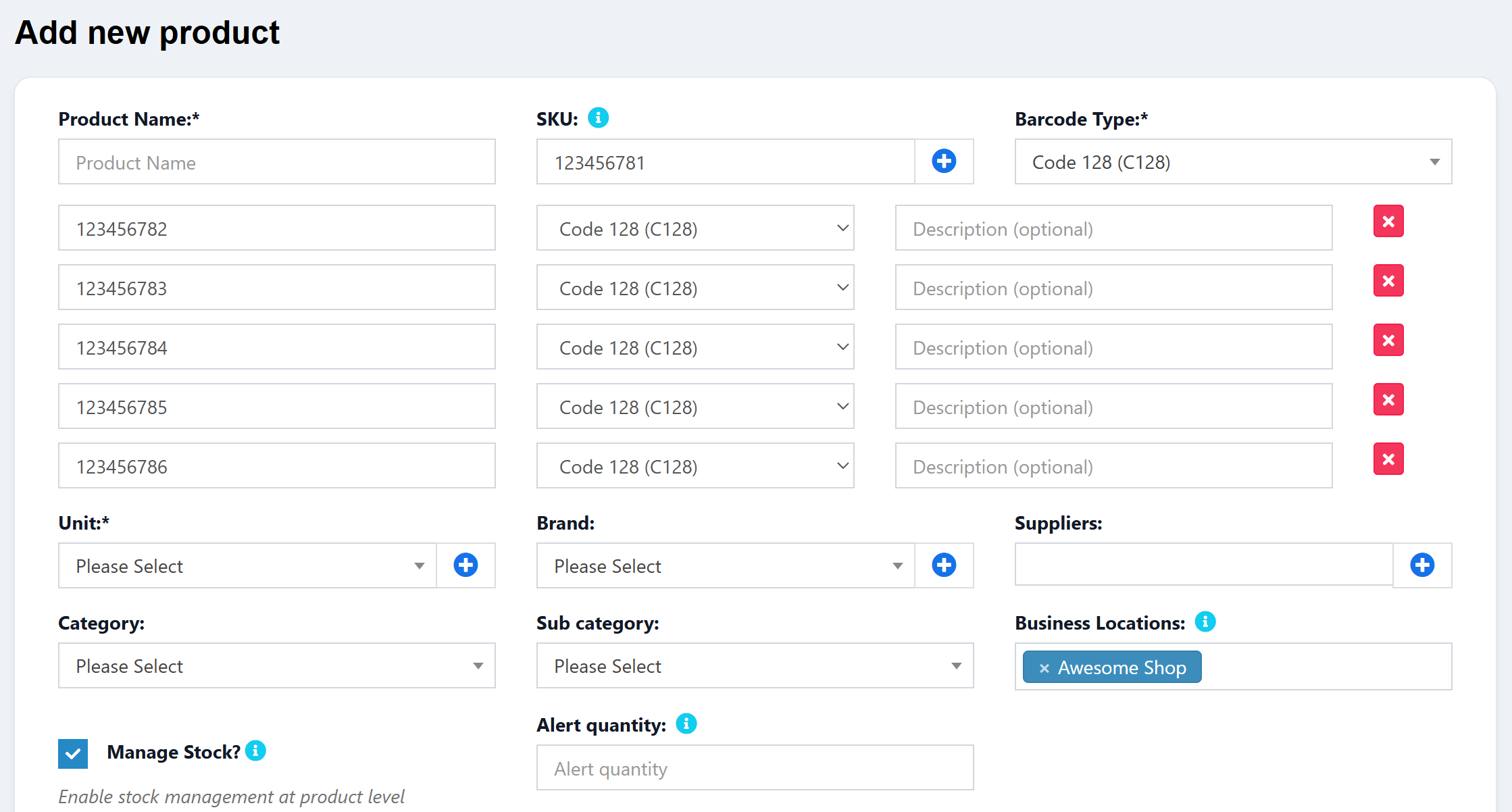
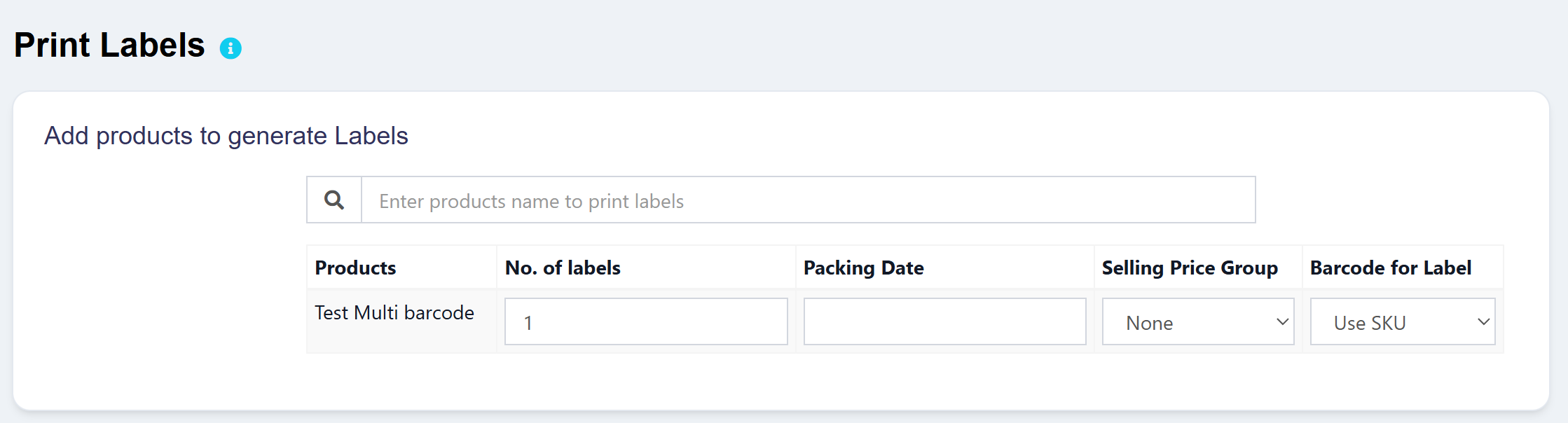
Download
Step 1: Database Structure
Migration
Create a new migration for the product_barcodes table:
php artisan make:migration create_product_barcodes_table
Migration Content:
<?php

use Illuminate\Database\Migrations\Migration;
use Illuminate\Database\Schema\Blueprint;
use Illuminate\Support\Facades\Schema;

return new class extends Migration
{
    /**
     * Run the migrations.
     *
     * @return void
     */
    public function up()
    {
        Schema::create('product_barcodes', function (Blueprint $table) {
            $table->id();
            $table->unsignedInteger('product_id');
            $table->string('barcode', 191);
            $table->string('barcode_type', 20)->default('C128');
            $table->string('description', 191)->nullable();
            $table->timestamps();

            $table->foreign('product_id')->references('id')->on('products')->onDelete('cascade');
            $table->index('barcode');
            $table->unique(['product_id', 'barcode']);
        });
    }

    /**
     * Reverse the migrations.
     *
     * @return void
     */
    public function down()
    {
        Schema::dropIfExists('product_barcodes');
    }
};
Direct SQL (Alternative):
CREATE TABLE `product_barcodes` (
  `id` BIGINT UNSIGNED NOT NULL AUTO_INCREMENT PRIMARY KEY,
  `product_id` INT UNSIGNED NOT NULL,
  `barcode` VARCHAR(191) NOT NULL,
  `barcode_type` VARCHAR(20) NOT NULL DEFAULT 'C128',
  `description` VARCHAR(191) NULL,
  `created_at` TIMESTAMP NULL,
  `updated_at` TIMESTAMP NULL,

  CONSTRAINT `fk_product_barcodes_product_id`
    FOREIGN KEY (`product_id`) REFERENCES `products`(`id`) ON DELETE CASCADE,

  UNIQUE KEY `unique_product_barcode` (`product_id`, `barcode`),
  INDEX `idx_product_barcodes_barcode` (`barcode`)
) ENGINE=InnoDB DEFAULT CHARSET=utf8mb4 COLLATE=utf8mb4_unicode_ci;
Run Migration:
php artisan migrate
Step 2: Create ProductBarcode Model
Create File: app/ProductBarcode.php
<?php

namespace App;

use Illuminate\Database\Eloquent\Model;

class ProductBarcode extends Model
{
    /**
     * The attributes that aren't mass assignable.
     *
     * @var array
     */
    protected $guarded = ['id'];

    /**
     * Get the product that owns the barcode.
     */
    public function product()
    {
        return $this->belongsTo(\App\Product::class);
    }
}
Step 3: Update Product Model
File: app/Product.php
Add the relationship method at the end of the class (before the closing }):
/**
 * Get the additional barcodes for the product.
 */
public function barcodes()
{
    return $this->hasMany(\App\ProductBarcode::class);
}
Step 4: Update ProductUtil
File: app/Utils/ProductUtil.php
4.1 Add syncProductBarcodes Method
Add this method after the generateSubSku() method:
/**
 * Sync product barcodes.
 *
 * @param  \App\Product  $product
 * @param  array  $barcodes
 * @return void
 */
public function syncProductBarcodes($product, $barcodes)
{
    // Delete existing barcodes
    $product->barcodes()->delete();

    // Add new barcodes
    if (!empty($barcodes)) {
        foreach ($barcodes as $barcode) {
            if (!empty($barcode['barcode'])) {
                $product->barcodes()->create([
                    'barcode' => $barcode['barcode'],
                    'barcode_type' => $barcode['barcode_type'] ?? 'C128',
                    'description' => $barcode['description'] ?? null,
                ]);
            }
        }
    }
}
4.2 Update filterProduct Method for Search
In the filterProduct() method, find the LIKE search block and add barcode search after sub_sku:
if (in_array('sub_sku', $search_fields)) {
    $query->orWhere('sub_sku', 'like', '%'.$search_term.'%');
}

// Search in product_barcodes table
if (in_array('sku', $search_fields) || in_array('sub_sku', $search_fields)) {
    $query->orWhereExists(function ($subquery) use ($search_term) {
        $subquery->select(\DB::raw(1))
            ->from('product_barcodes')
            ->whereColumn('product_barcodes.product_id', 'products.id')
            ->where('product_barcodes.barcode', 'like', '%'.$search_term.'%');
    });
}
Also add the same for the EXACT search block:
if (in_array('sub_sku', $search_fields)) {
    $query->orWhere('sub_sku', $search_term);
}

// Search in product_barcodes table (exact match)
if (in_array('sku', $search_fields) || in_array('sub_sku', $search_fields)) {
    $query->orWhereExists(function ($subquery) use ($search_term) {
        $subquery->select(\DB::raw(1))
            ->from('product_barcodes')
            ->whereColumn('product_barcodes.product_id', 'products.id')
            ->where('product_barcodes.barcode', $search_term);
    });
}
Step 5: Update ProductController
File: app/Http/Controllers/ProductController.php
5.1 Update store() Method
After the supplier sync code, add:
//Add product barcodes
$product_barcodes = $request->input('product_barcodes', []);
if (!empty($product_barcodes)) {
    $this->productUtil->syncProductBarcodes($product, $product_barcodes);
}
5.2 Update edit() Method
Load the barcodes relationship:
$product = Product::where('business_id', $business_id)
                    ->with(['product_locations', 'suppliers', 'barcodes'])
                    ->where('id', $id)
                    ->firstOrFail();
5.3 Update update() Method
After the supplier sync code, add:
//Sync product barcodes
$product_barcodes = $request->input('product_barcodes', []);
$this->productUtil->syncProductBarcodes($product, $product_barcodes);
Step 6: Update Search in Other Controllers
6.1 SellPosController
File: app/Http/Controllers/SellPosController.php
Find the search block in getProductSuggestion() method and update:
//Include search
if (!empty($term)) {
    $products->where(function ($query) use ($term) {
        $query->where('p.name', 'like', '%' . $term . '%');
        $query->orWhere('sku', 'like', '%' . $term . '%');
        $query->orWhere('sub_sku', 'like', '%' . $term . '%');
        // Search in product_barcodes table
        $query->orWhereExists(function ($subquery) use ($term) {
            $subquery->select(\DB::raw(1))
                ->from('product_barcodes')
                ->whereColumn('product_barcodes.product_id', 'p.id')
                ->where('product_barcodes.barcode', 'like', '%' . $term . '%');
        });
    });
}
6.2 PurchaseController
File: app/Http/Controllers/PurchaseController.php
Update the search in getProducts() method:
->where(function ($query) use ($term) {
    $query->where('products.name', 'like', '%'.$term.'%');
    $query->orWhere('sku', 'like', '%'.$term.'%');
    $query->orWhere('sub_sku', 'like', '%'.$term.'%');
    // Search in product_barcodes table
    $query->orWhereExists(function ($subquery) use ($term) {
        $subquery->select(\DB::raw(1))
            ->from('product_barcodes')
            ->whereColumn('product_barcodes.product_id', 'products.id')
            ->where('product_barcodes.barcode', 'like', '%'.$term.'%');
    });
})
6.3 UniversalSearchController
File: app/Http/Controllers/UniversalSearchController.php
Update the search in searchProducts() method:
->where(function($q) use ($query) {
    $q->where('products.name', 'like', "%{$query}%")
      ->orWhere('products.sku', 'like', "%{$query}%")
      ->orWhere('variations.sub_sku', 'like', "%{$query}%")
      ->orWhere('products.product_description', 'like', "%{$query}%")
      // Search in product_barcodes table
      ->orWhereExists(function ($subquery) use ($query) {
          $subquery->select(\DB::raw(1))
              ->from('product_barcodes')
              ->whereColumn('product_barcodes.product_id', 'products.id')
              ->where('product_barcodes.barcode', 'like', "%{$query}%");
      });
})
Step 7: Create Barcode Input Partial View
Create File: resources/views/product/partials/product_barcodes.blade.php
This partial contains only the container for barcode rows - the add button is placed next to the SKU field.
<div class="col-sm-12">
    <div class="form-group">
        <div id="product_barcodes_container">
            @if(isset($product) && $product->barcodes && $product->barcodes->count() > 0)
                @foreach($product->barcodes as $index => $barcode)
                    <div class="barcode-row row" style="margin-bottom: 10px;" data-row-index="{{ $index }}">
                        <div class="col-md-4">
                            <input type="text" name="product_barcodes[{{ $index }}][barcode]"
                                   class="form-control"
                                   placeholder="@lang('product.barcode')"
                                   value="{{ $barcode->barcode }}">
                        </div>
                        <div class="col-md-3">
                            {!! Form::select("product_barcodes[{$index}][barcode_type]",
                                $barcode_types,
                                $barcode->barcode_type,
                                ['class' => 'form-control select2', 'style' => 'width: 100%;']
                            ) !!}
                        </div>
                        <div class="col-md-4">
                            <input type="text" name="product_barcodes[{{ $index }}][description]"
                                   class="form-control"
                                   placeholder="@lang('product.barcode_description')"
                                   value="{{ $barcode->description }}">
                        </div>
                        <div class="col-md-1">
                            <button type="button" class="btn btn-danger btn-xs remove-barcode-row" style="padding: 2px 6px;">
                                <i class="fa fa-times" style="font-size: 12px;"></i>
                            </button>
                        </div>
                    </div>
                @endforeach
            @endif
        </div>
    </div>
</div>

<script type="text/template" id="barcode_row_template">
    <div class="barcode-row row" style="margin-bottom: 10px;" data-row-index="__INDEX__">
        <div class="col-md-4">
            <input type="text" name="product_barcodes[__INDEX__][barcode]"
                   class="form-control"
                   placeholder="@lang('product.barcode')">
        </div>
        <div class="col-md-3">
            <select name="product_barcodes[__INDEX__][barcode_type]" class="form-control">
                @foreach($barcode_types as $key => $value)
                    <option value="{{ $key }}">{{ $value }}</option>
                @endforeach
            </select>
        </div>
        <div class="col-md-4">
            <input type="text" name="product_barcodes[__INDEX__][description]"
                   class="form-control"
                   placeholder="@lang('product.barcode_description')">
        </div>
        <div class="col-md-1">
            <button type="button" class="btn btn-danger btn-xs remove-barcode-row" style="padding: 2px 6px;">
                <i class="fa fa-times" style="font-size: 12px;"></i>
            </button>
        </div>
    </div>
</script>
Step 8: Update Product Create/Edit Views
8.1 Update create.blade.php
File: resources/views/product/create.blade.php
First, update the SKU field to add the plus button (like Unit field):
<div class="col-sm-4">
    <div class="form-group">
        {!! Form::label('sku', __('product.sku') . ':') !!} @show_tooltip(__('tooltip.sku'))
        <div class="input-group">
            {!! Form::text('sku', null, ['class' => 'form-control',
            'placeholder' => __('product.sku')]); !!}
            <span class="input-group-btn">
                <button type="button" class="btn btn-default bg-white btn-flat" id="add_barcode_row" title="@lang('product.add_barcode')">
                    <i class="fa fa-plus-circle text-primary fa-lg"></i>
                </button>
            </span>
        </div>
    </div>
</div>
Then, after the barcode_type field and the first <div class="clearfix"></div>, add:
@include('product.partials.product_barcodes')

<div class="clearfix"></div>
8.2 Update edit.blade.php
File: resources/views/product/edit.blade.php
Update the SKU field to add the plus button:
<div class="col-sm-4">
  <div class="form-group">
    {!! Form::label('sku', __('product.sku')  . ':*') !!} @show_tooltip(__('tooltip.sku'))
    <div class="input-group">
      {!! Form::text('sku', $product->sku, ['class' => 'form-control',
      'placeholder' => __('product.sku'), 'required']); !!}
      <span class="input-group-btn">
        <button type="button" class="btn btn-default bg-white btn-flat" id="add_barcode_row" title="@lang('product.add_barcode')">
          <i class="fa fa-plus-circle text-primary fa-lg"></i>
        </button>
      </span>
    </div>
  </div>
</div>
Then include the partial after the barcode_type field:
@include('product.partials.product_barcodes')

<div class="clearfix"></div>
Step 9: Add JavaScript for Dynamic Barcode Rows
File: public/js/product.js
Add at the end of the file:
// Product Additional Barcodes - Add new barcode row
$(document).on("click", "#add_barcode_row", function () {
  var rowIndex = $("#product_barcodes_container .barcode-row").length;
  var template = $("#barcode_row_template").html();
  template = template.replace(/__INDEX__/g, rowIndex);
  $("#product_barcodes_container").append(template);
});

// Product Additional Barcodes - Remove barcode row
$(document).on("click", ".remove-barcode-row", function () {
  $(this).closest(".barcode-row").remove();
  // Re-index remaining rows
  $("#product_barcodes_container .barcode-row").each(function (index) {
    $(this).attr("data-row-index", index);
    $(this)
      .find("input, select")
      .each(function () {
        var name = $(this).attr("name");
        if (name) {
          name = name.replace(
            /product_barcodes\[\d+\]/,
            "product_barcodes[" + index + "]"
          );
          $(this).attr("name", name);
        }
      });
  });
});
Step 10: Label Printing with Barcode Selection
10.1 Update LabelsController
File: app/Http/Controllers/LabelsController.php
Update the show() method to load product barcodes:
//Get products for the business
$products = [];
$price_groups = [];
if ($purchase_id) {
    $products = $this->transactionUtil->getPurchaseProducts($business_id, $purchase_id);
} elseif ($product_id) {
    $products = $this->productUtil->getDetailsFromProduct($business_id, $product_id);
}

// Load product barcodes for each product
if (!empty($products)) {
    foreach ($products as $product) {
        $product->product_barcodes = \App\ProductBarcode::where('product_id', $product->product_id)->get();
    }
}
Update the addProductRow() method:
if (! empty($product_id)) {
    $index = $request->input('row_count');
    $products = $this->productUtil->getDetailsFromProduct($business_id, $product_id, $variation_id);

    // Load product barcodes for each product
    foreach ($products as $product) {
        $product->product_barcodes = \App\ProductBarcode::where('product_id', $product->product_id)->get();
    }

    $price_groups = SellingPriceGroup::where('business_id', $business_id)
                                ->active()
                                ->pluck('name', 'id');

    return view('labels.partials.show_table_rows')
            ->with(compact('products', 'index', 'price_groups'));
}
Update the preview() method to handle selected barcode:
foreach ($products as $value) {
    $details = $this->productUtil->getDetailsFromVariation($value['variation_id'], $business_id, null, false);

    // ... existing code for exp_date, packing_date, lot_number ...

    // Handle selected barcode for printing
    if (! empty($value['selected_barcode_id'])) {
        $selectedBarcode = \App\ProductBarcode::find($value['selected_barcode_id']);
        if ($selectedBarcode) {
            $details->print_barcode = $selectedBarcode->barcode;
            $details->print_barcode_type = $selectedBarcode->barcode_type;
        }
    }

    // ... rest of the code ...
}
10.2 Update Label Views
File: resources/views/labels/show.blade.php
Add a new table header column:
<th>@lang('lang_v1.selling_price_group')</th>
<th>@lang('product.select_barcode_for_label')</th>
File: resources/views/labels/partials/show_table_rows.blade.php
Add barcode selector column after price group:
<td>
    {!! Form::select('products[' . $row_index . '][price_group_id]', $price_groups, null, ['class' => 'form-control', 'placeholder' => __('lang_v1.none')]); !!}
</td>
<td>
    @php
        $displaySku = !empty($product->sub_sku) ? $product->sub_sku : (!empty($product->sku) ? $product->sku : '');
    @endphp
    <select name="products[{{ $row_index }}][selected_barcode_id]" class="form-control">
        <option value="">@lang('product.use_sku')@if($displaySku) ({{ $displaySku }})@endif</option>
        @if(isset($product->product_barcodes) && $product->product_barcodes->count() > 0)
            @foreach($product->product_barcodes as $barcode)
                <option value="{{ $barcode->id }}">
                    {{ $barcode->barcode }}
                    @if($barcode->description) ({{ $barcode->description }}) @endif
                </option>
            @endforeach
        @endif
    </select>
</td>
File: resources/views/labels/partials/preview_2.blade.php
Update the barcode generation section:
{{-- Barcode --}}
@php
    $printBarcode = $page_product->print_barcode ?? $page_product->sub_sku;
    $printBarcodeType = $page_product->print_barcode_type ?? $page_product->barcode_type;
@endphp
<img style="max-width:90% !important;height: {{$barcode_details->height*0.24}}in !important; display: block;" src="data:image/png;base64,{{DNS1D::getBarcodePNG($printBarcode, $printBarcodeType, 3,90, array(0, 0, 0), false)}}">

<span style="font-size: 10px !important">
    {{$printBarcode}}
</span>
Step 11: Add Language Translations
File: lang/en/product.php
Add these translations:
'additional_barcodes' => 'Additional Barcodes',
'add_barcode' => 'Add Barcode',
'barcode' => 'Barcode',
'barcode_description' => 'Description (optional)',
'use_sku' => 'Use SKU',
'select_barcode_for_label' => 'Barcode for Label',
File: lang/en/tooltip.php
Add this tooltip:
'additional_barcodes' => 'Add multiple barcodes for this product. These barcodes can be used to search and identify the product in addition to the main SKU.',
Summary
After implementing all the steps above, you will have:
Multiple barcodes per product - Each product can have unlimited additional barcodes
Barcode type support - Each barcode can have its own type (C128, C39, EAN-13, etc.)
Optional descriptions - Add notes like "Supplier barcode" or "Old SKU"
Full search integration - Products are searchable by any of their barcodes in:
POS product search
Purchase product search
Universal search
Label printing selection - Choose which barcode to print on labels
Files Modified Summary
File | Changes |
|---|---|
| New model |
| Added |
| Added |
| Updated |
| Updated search query |
| Updated search query |
| Updated search query |
| Added barcode selection support |
| New partial view |
| Include barcode partial |
| Include barcode partial |
| Added column header |
| Added barcode selector |
| Use selected barcode |
| Added dynamic row JavaScript |
| Added translations |
| Added tooltip |
Recommended Comments