Nirob Kayes
Members
-
Joined
-
Last visited
Files posted by Nirob Kayes
-
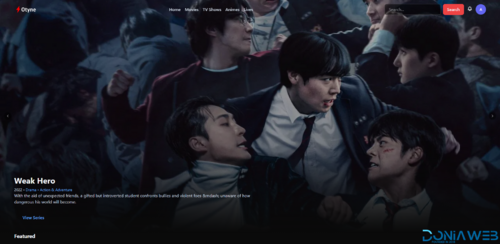
Stream Movie, Tv shows, Animes Without limit with Streamigo. Streamigo is a highly customizable streaming platform.
User & Account Features
User Login & Registration
Full Account Management
Social Login (Google)
User Roles & Permissions
Multiple Admins & Moderators
Complete User Control Panel
Maintenance Mode
Security & Protection
CAPTCHA System:
Google reCAPTCHA v2 & v3
Cloudflare Turnstile
Protection available on:
Entire website or
Login / Registration pages only
Storage, CDN & Infrastructure
AWS Support
Cloudflare R2
Backblaze B2
CDN Integration for fast global delivery
Multiple Video Source Support
Media & Streaming Features
TMDB Integration (easy search & auto-fetch)
Supported Video Types:
HLS
MP4 / MKV
Embed
Direct Upload
External URL
RTMP
YouTube
Scheduled Live Streams
Live Streaming Support
Episode Switching Inside Player
Trailers Support
Separate Sections for Movies, TV Shows, Anime & Live Streams
Player Experience
Modern, responsive Video Player
Multiple Source Switching
Resume Playback (Continue Watching)
Watch History
Watchlist
Episode Selector (TV Shows)
Commmunity
Notification System
Comments Section
Content Request System
Advanced Search with Filters
Promotion
Built-in Ads System
Popup Notices / Banner Announcements
Homepage Sliders
Multiple Custom Sliders
Customization & UI
Full Site Customization
Homepage Section Management
Category System
Language Management
Separate Anime Section
Custom Pages & Layout Control
Admin Panel & Dashboard
Powerful yet Easy-to-Use Admin Panel
Full Control Over:
Movies
TV Shows
Live Streams
Users
Categories
Ads
Modern Admin Dashboard
SMTP Email Support
System-wide Settings Control
Item/Page SEO
Application
Includes a Basic App
API-ready structure
Scalable architecture
- 12.00 EUR
- 1 Purchases
-
Browse the internet with complete privacy, security, and freedom using our Private Browser with Incognito. Unblock websites, protect your identity, and surf anonymously—anytime, anywhere.
Whether you're using public WiFi or need private access to blocked websites, this app gives you total control of your online privacy.
Features
Key Features of Private Web Browser:
Fast Browser: Lightning-speed browsing with incognito mode
Anonymous Surfing: Hide your IP and stay invisible online
* Secure & Encrypted: Advanced encryption for safe browsing
* Unblock Websites & Apps: Access any content without restrictions
* Lightweight & Battery Friendly
* User-Friendly Interface
* AdMob & Facebook ads Integrated
* Android 16 support with SDK 36
Requirements
Android Studio
Instructions
Instructions added in documentation file.
- Free
- 28 Downloads
-
Flixoo is an all-in-one video streaming and sharing Application for Android and iOS and Web CMS designed to help creators, media companies, and businesses launch their own OTT platform effortlessly. It supports movies, TV shows, live TV, and blogs with stunning HD quality, adaptive streaming, and seamless multi-platform compatibility across Web, Mobile (Android & iOS), and Smart TVs.
With fully customizable channels, flexible monetisation options, subscription plans, rentals, and advanced ad integration, Flixoo provides everything you need to grow your audience, increase engagement, and maximise revenue—without any recurring fees or hidden costs. Experience the future of video streaming with a platform built for performance, scalability, and global reach.
- Free
- 670 Downloads
-
Overview
Transform your ecommerce vision into reality with this high-performance, full-stack Next.js 15 template, designed for developers, entrepreneurs, and agencies. Built with React 19, TailwindCSS, and ShadCN UI, this project delivers a modern, responsive storefront with seamless Stripe integration, real-time stock tracking, and advanced product filtering.
Whether you’re a developer building your portfolio, a student mastering modern tech stacks, or a business owner launching an online store, this template offers:
Lightning-fast performance via SSR/SSG and Vercel-optimized deployment.
Secure, PCI-compliant payments with Stripe’s one-click checkout.
Professional animations using Framer Motion for engaging user experiences.
Effortless customization with modular components and a clean codebase.
Deploy in minutes, scale infinitely, and stay ahead with 2024’s leading technologies.
Features
✅ Next.js 15 & React 19 – Maximize SEO and speed with server-side rendering, static generation, and API routes.
✅ Stripe Integration – Secure payment processing, subscription support, and real-time transaction dashboards
Requirements
Node.js v18+
Stripe & Clerk API keys
Vercel account (for deployment)
Basic familiarity with React/Next.js
Instructions
Purchase & Download – Get instant access to the full source code.
Install Dependencies – Run npm install to set up packages.
Configure Environment – Add Stripe, Clerk, and Sanity API keys to .env.local.
Customize Content – Update products, branding, and styles via Tailwind or Sanity CMS.
Deploy – Push to GitHub and deploy on Vercel with a single click.
- Free
- 42 Downloads