






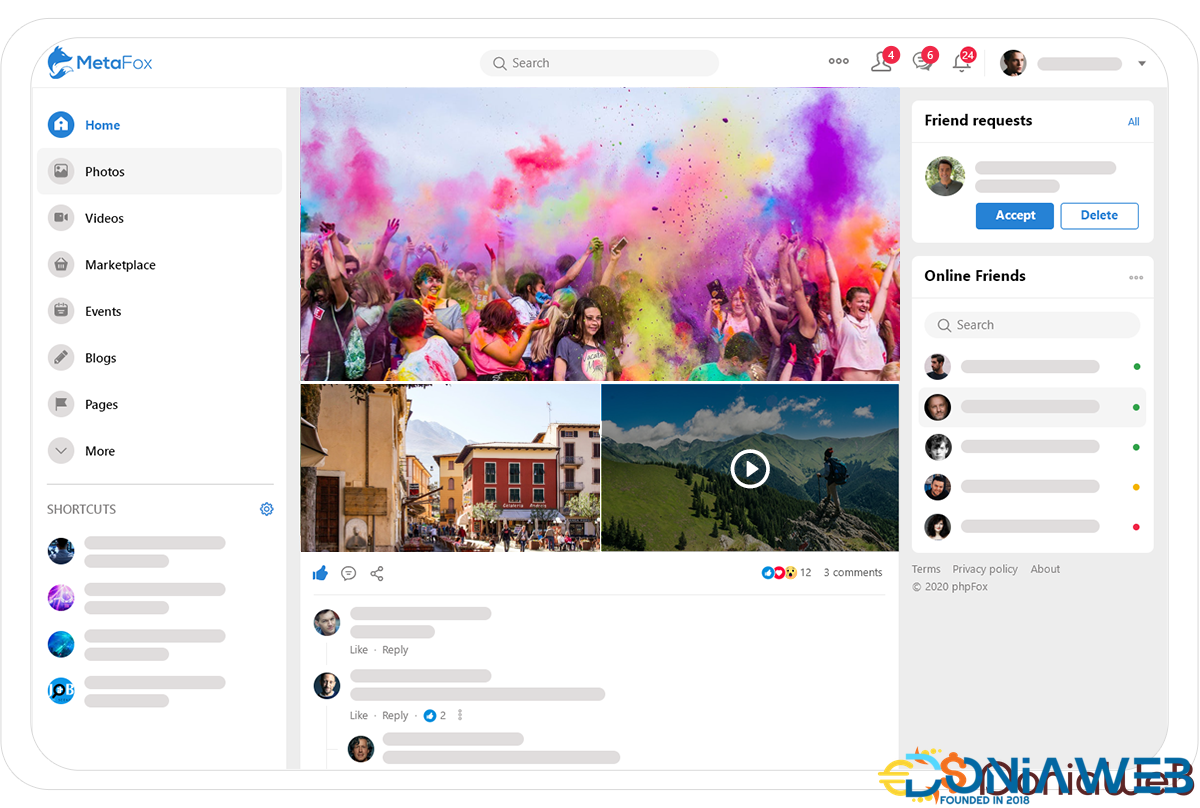
Explore Powerful Features
MetaFox accelerates your online community development process and provides a smooth user experience.
Dynamic Activity Feed
The dynamic Activity Feed displays all the recent activities on your site. It provides your community with a delightful experience to share, discover and engage.
Photos and Videos
Insert emojis
Tag friends
Check-in
Add polls
Share and React to posts
Instant Messaging
ChatPlus solution allows community members to communicate directly via advanced messaging, audio & video calls, and public or private group chats to enable engaging conversations.
Emojis, GIFs, reactions
Files Sharing
Group Chats
Audio Calls
Video Calls
Voice Messages
Powerful Layout Editor
We empower the Admin to easily customize the appearance and content blocks with live previews to create unique and interest-focused communities.
Change layout
Edit content
Dark Mode toggle
View on devices
Live preview
View history
Highlight Feature
Mobile Apps
A well-designed and feature-rich mobile app is a must for every business & community. No worries, we got you covered with our MetaFox iOS and Android app.
White-label apps
Premium mobile apps for businesses of any size and industry
Powerful iOS and Android app
Get modern apps that can transform your business and help it grow
Admin Control Panel
The Admin dashboard displays real-time information and in-depth analytics of your community enabling you to make key decisions on how to grow your community bigger and better.
Comprehensive Dashboard
In-depth Statistics
Change look and feel
Modify page settings
What's New in Version 5.1.18
Released
1. New App
Tour Guide (new app)
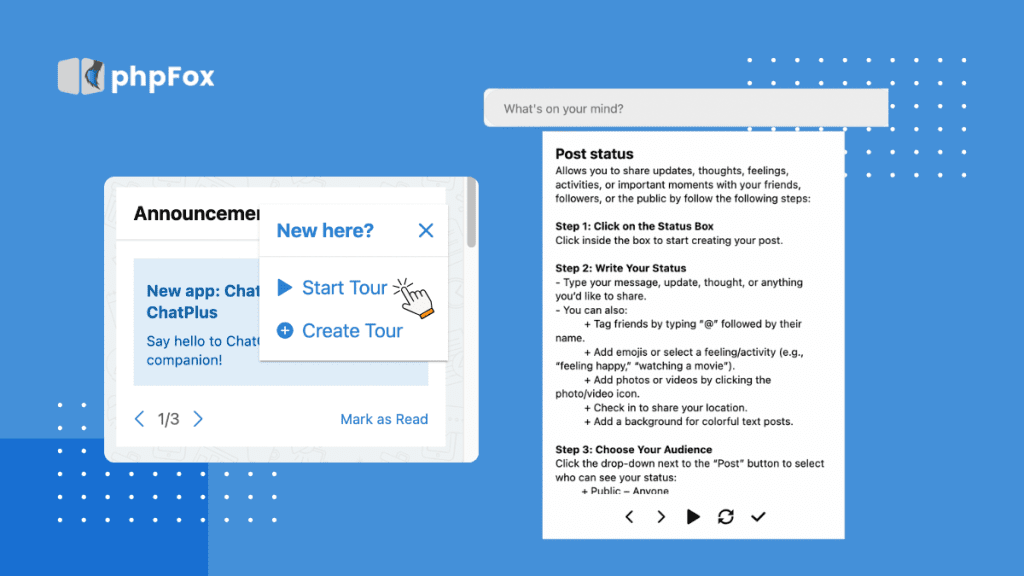
Excited to show off your platform? So are we! The Tour Guide app is here to help you create engaging, interactive walkthroughs that guide your users through the heart of your community. Whether they’re brand new or exploring fresh features, Tour Guide makes every step feel intuitive and exciting. It’s easy to set up, fun to use, and a powerful way to turn first-time visitors into confident, happy members. Let’s show them around!
Highlighted Features
Site administrators can create a unique tour guide for each page and add multiple steps to guide users through specific elements or workflows.
Users can experience the tour guide step-by-step on the selected page.
Users can repeat the tour, go back to a previous step, refresh the guide, move forward, or end it at any time.
The tour guide is automatically disabled once the user finishes it, ensuring a clean and unobtrusive experience.
2. Core Updates
Admin CP
Members Management
Admins can now export user data to a CSV file directly from the AdminCP.
Super Administrators can designate other users as Super Administrators
Member Settings: Add a new setting to control token lifetime.
Registration Settings
Admins can assign multiple users as ‘On Signup New Friends’—a great way to boost engagement from the first login.
“Send Welcome Email” setting has been removed. Welcome emails are now managed via:
AdminCP > App Settings > Notifications > Types > App Name (User)
Global & Visual Settings
You can now configure a custom logo for emails, adding a consistent brand touch to every message.
Reports & Notifications
Admins can now choose who receives notifications for new user reports—ensuring issues are seen and handled quickly
Localization Enhancements
Admins can now set the default country and language to streamline onboarding for users in specific regions.
Staff Permissions
Fine-grained AdminCP access control now available—manage what your staff can see and do with new permission settings.
Storage Settings
Storage configurations can now be removed even if they contain uploaded files, giving admins more control over storage cleanup.
Ban Filters & Validation
A new “Active” column has been added to all ban filter pages (Email, IP Address, Word).
System now validates email format before adding it to the banned list.
Regex rules are now checked for correct formatting before being accepted.
UI/UX Improvements
We’ve made several refinements across both the web and mobile app to enhance the overall user experience—from cleaner layouts to better responsiveness and smoother interactions
💻 Frontend Web Enhancements
Improved usability on the Dashboard: the member item viewer no longer appears when hovering over a member’s name.
User info updates now reflect instantly after editing—no need to refresh!
On mobile view: Notification badge count is now hidden after opening the notification popup, keeping the interface clean.
Global Search View: Removed repetitive titles when viewing type details for a more streamlined experience.
You can now change the language directly from the Registration page, improving accessibility for new users worldwide.
Enhanced color border contrast for better visibility and accessibility.
📱 Mobile App Enhancements
In the Composer Feed, the URL Video button is now hidden when posting in Events, User Profiles, Groups, and Pages—making the interface cleaner where it’s not needed.
Date of Birth field now behaves more intuitively when selecting data, improving the overall registration flow.
3. App Update
🌟 Invitations
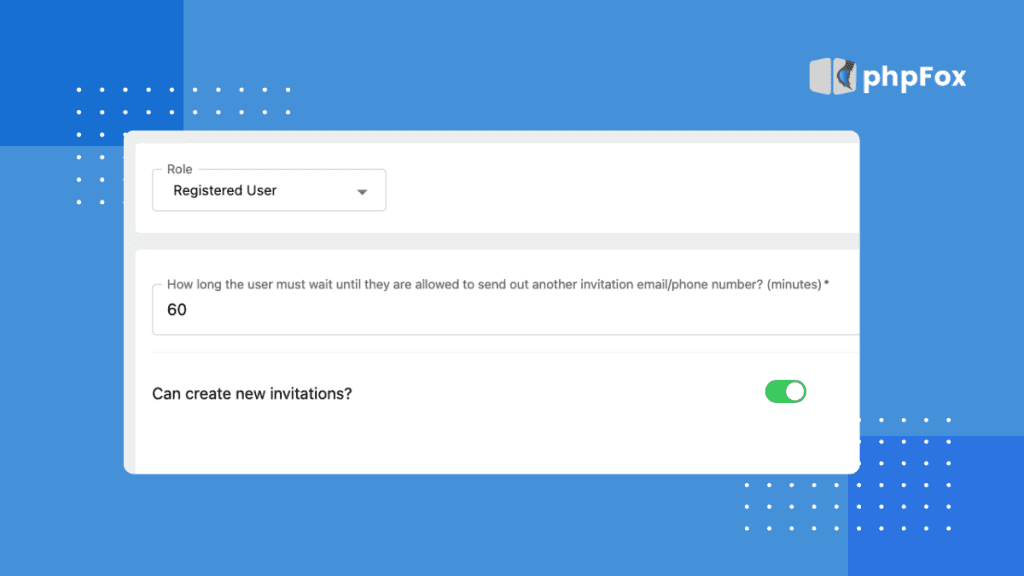
New Permissions & Features
Set Invitation Permissions: Admins can now define exactly who’s allowed to invite others to the platform.
Refresh Invite Code: A handy new feature that allows users to refresh their invite codes as needed.
Manage Invite Codes: Easily track and manage all invite codes in one place.
Smart Cleanup: If the inviter’s account is deleted, their invite code is automatically deactivated—keeping your system clean and secure.
AdminCP UI/UX Improvements
Smarter Layouts:
Repositioned the Search button for easier access.
Added mass delete actions and sortable columns to the Manage Invitations page.
Enhanced checkbox UI for better usability when resending multiple invites.
Improved Messaging: Invitation content now displays more clearly—even if no personal message was added.
Bug fixes
🌟 E-wallet
New Permissions & Features
Adjust User Balance: Admins can now manually adjust a user’s wallet balance directly from the AdminCP—perfect for corrections or bonus credits.
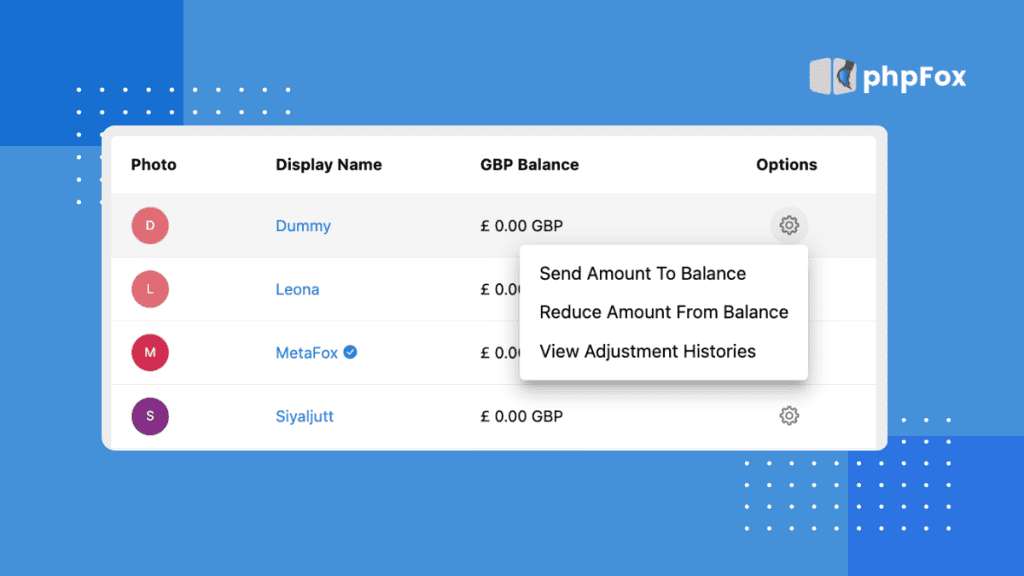
Frontend UX Enhancements
Smarter Navigation: After submitting a withdrawal request, users are now redirected straight to the Withdrawal Requests page—no more guesswork.
Bug fixes
🌟 Marketplace
UI/UX Improvements
Improved how pending invoices are handled when a listing expires or the price changes.
The “Repayment” option has been renamed to “Pay Now” for clearer user understanding.
The Pay Now button is now visible directly on listings that require it.
Added more status filter options in the search form, making it easier to manage listings at scale.
Map UX Fix: Clicking on a listing title in the map view no longer triggers an annoying zoom-in.
Bug fixes
🌟 Activity Points
UI/UX Improvements:
On the Package Transaction Page:
Added a “Pay Now” option for pending transactions, allowing users to pay again.
Remade the “ID” column to “Transaction ID” for better clarity.
Admin/Users: Now you can order data by columns for easier management and review.
AdminCP:
Added a Payment Method column and filter, allowing admins to manage package transactions by payment method.
Bug fixes
Other minor improvements and bug fixes for:
Chat Plus
Forum
Photo
Announcement
Story
Newsletter
And more
*Note: For a detailed improvements list of phpFox 5.1.18 , please visit our official 5.1.18 Release Notes for a deeper understanding of the update.🔰 The package of phpFox 5.1.18 is available for you to download in our Client Area. To update your phpFox site to version 5.1.18, run the upgrade routine following our Update Instructions. Update today and unlock a world of possibilities with phpFox version 5 (Metafox)! We highly recommend you back up your site and database before updating. And remember to check with 3rd-party experts about the compatibility of all the apps/templates you use.
🔑 For the new phpFox version 5 (Metafox) installation, you can follow the Installation Guide.
Upgrade to phpFox 5.1.18 today to take advantage of these enhancements and ensure your platform runs smoothly! 🚀
-
 2
2
-
 1
1
-
.gif) 1
1




.thumb.png.bb0bf549f311386c17a735d76c58dc29.png)









Recommended Comments
Join the conversation
You can post now and register later. If you have an account, sign in now to post with your account.
Note: Your post will require moderator approval before it will be visible.