




Skip to content
View in the app

A better way to browse. Learn more.

DoniaWeB

A full-screen app on your home screen with push notifications, badges and more.

To install this app on iOS and iPadOS
  1. Tap the Share icon in Safari
  2. Scroll the menu and tap Add to Home Screen.
  3. Tap Add in the top-right corner.
To install this app on Android
  1. Tap the 3-dot menu (⋮) in the top-right corner of the browser.
  2. Tap Add to Home screen or Install app.
  3. Confirm by tapping Install.
     

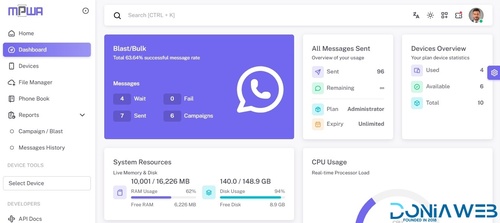
Whatsapp Gateway | Multi Device v15.0.0

Featured Replies

  • Replies 9.5k
  • Views 1.3m
  • Created
  • Last Reply

Top Posters In This Topic

Most Popular Posts

  • Magd Almuntaser
    Magd Almuntaser

    What's new in version 11.0.0 (so far): - Added Chat System (Customer Service). - Fixed Connection problems With WhatsApp. - Fixed Generate QR Via API. - Fixed Delete Sections From Edit List Page. - Fi

  • Magd Almuntaser
    Magd Almuntaser

    English: Version 14.0.0 is now nearly complete. A lot has been changed in this version because of the plugin system, as features have been separated and converted into plugins. Therefore: Testers are

  • Magd Almuntaser
    Magd Almuntaser

    Version 11.0.1 has been released What's new in version 11.0.1: - Fixed Stop/Start AI In Conversations. - Fixed Chat Date (Database). - Fixed Migrate To Database. - Fixed Plans Page.

Most Helpful Posts

  • Magd Almuntaser
    Magd Almuntaser

    English (EN) I have already informed you that WhatsApp is rolling out new updates. These updates are being sent to some numbers first and will gradually reach all numbers worldwide. The first update i

  • Magd Almuntaser
    Magd Almuntaser

    What will be available in version 11.0.0: - A chat system will be added. - A customer service system will be added (integrated with chat). - Some Indian payment gateways will be added. - Order design

  • i give you the step: Stop your Node server. Download the files validate-connection.js and validate-connection.d.ts from the links provided below. Go to the directory: /your_mpwa_directory/node_modul

Posted Images

  • Community Expert
  • Author
1 hour ago, Juxhin said:

i still get the error that cant login like versions before when change some baileys with code i think, it was ok before update, so any idea? it just keep loggin in rotating and nothing :D. thanks for your amazing work !!@Magd Almuntaser 

Do you use aapanel or cpanel?
Do you see information about ram and cpu in dashboard page?

34 minutes ago, Ahmed Elsayed 123 said:

hello @Magd Almuntaser
my website on verpex.com ( Cpanel )
verpex i think in Germany.

Your website location is UK
mpwa marketplace have server in uk so i don't know what is the problem, but you can try to cleae cache by open this links:

https://example.com/clear-cache
https://example.com/view-clear

And try again to open update page ..
if still not working and you have SSH you can enter this commend in SSH:
ping -c 3 51.77.102.152

and send my the results

@Magd Almuntaser  i have installation directly on vps linux server, i have 24 gb ram and only used 2 gb ram total


it worked now :D thanks , dont know what happened :D thanks for your amazing work :D

Edited by Juxhin

3 hours ago, Magd Almuntaser said:

Do you use aapanel or cpanel?
Do you see information about ram and cpu in dashboard page?

Your website location is UK
mpwa marketplace have server in uk so i don't know what is the problem, but you can try to cleae cache by open this links:

https://example.com/clear-cache
https://example.com/view-clear

And try again to open update page ..
if still not working and you have SSH you can enter this commend in SSH:
ping -c 3 51.77.102.152

and send my the results

its working now
thanks

  • Community Expert
  • Author
13 hours ago, RAGHAVENDRA PRATAP MAURYA said:

@Magd Almuntaser

Kindly update code for working button.

Kindly do....

Work list button without images.

Work cta button with images.

Work reply button without images.

WhatsApp has closed this exploit, so MPWA is forced to upload an image with the buttons..

However, I am currently working on the old autoreply plugin, which uses a different method, but it only works on Android and web, while the iOS has the exploit closed.. but it works without attaching an image.

Join the conversation

You can post now and register later. If you have an account, sign in now to post with your account.
Note: Your post will require moderator approval before it will be visible.

Guest
Unfortunately, your content contains terms that we do not allow. Please edit your content to remove the highlighted words below.
Reply to this topic...

Recently Browsing 0

  • No registered users viewing this page.

Latest Updated Files

Account

Navigation

Search

Search

Configure browser push notifications

Chrome (Android)
  1. Tap the lock icon next to the address bar.
  2. Tap Permissions → Notifications.
  3. Adjust your preference.
Chrome (Desktop)
  1. Click the padlock icon in the address bar.
  2. Select Site settings.
  3. Find Notifications and adjust your preference.