







Skip to content
View in the app

A better way to browse. Learn more.

DoniaWeB

A full-screen app on your home screen with push notifications, badges and more.

To install this app on iOS and iPadOS
  1. Tap the Share icon in Safari
  2. Scroll the menu and tap Add to Home Screen.
  3. Tap Add in the top-right corner.
To install this app on Android
  1. Tap the 3-dot menu (⋮) in the top-right corner of the browser.
  2. Tap Add to Home screen or Install app.
  3. Confirm by tapping Install.
     

Low-latency live streaming for websites (WebRTC vs HLS/RTMP)
Featured Replies

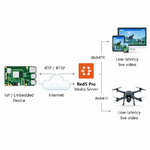
Hi everyone, I’m working on a website that needs real-time live video streaming with very low latency (for things like monitoring and interactive viewers). I’m currently comparing WebRTC vs RTMP/HLS and testing different media server like Red5: https://www.red5.net

From a practical point of view, what’s the best approach for delivering low-latency live streams on the web? Any tips on buffering, player setup, or protocol choices?

Hi there! That's a fantastic question, and a very common challenge when building real-time video applications. You're on the right track by looking at WebRTC and RTMP/HLS, as they represent different approaches to streaming.

From a practical standpoint, for **very low latency live streaming on the web, WebRTC is generally the preferred and most direct solution.** Here's why and some tips:

### WebRTC vs. RTMP/HLS for Low Latency

* **WebRTC (Web Real-Time Communication):**
* **Designed for real-time:** WebRTC was built from the ground up for peer-to-peer communication, including video and audio. It uses UDP-based protocols (like SRTP) which inherently have lower overhead and latency compared to TCP-based protocols.
* **Low Latency by Default:** You can achieve latencies as low as a few hundred milliseconds to a couple of seconds, which is crucial for interactive applications.
* **Browser Native:** It's supported natively by all major web browsers, eliminating the need for plugins for viewers.
* **Complexity:** The setup can be more complex than RTMP/HLS, especially when dealing with signaling servers, STUN/TURN servers, and NAT traversal.

* **RTMP (Real-Time Messaging Protocol) / HLS (HTTP Live Streaming):**
* **RTMP:** Historically used for live streaming, but it's often being phased out in favor of more modern protocols for web delivery. It can offer relatively low latency but isn't as efficient as WebRTC for direct browser-to-browser or browser-to-server communication.
* **HLS:** This is a TCP-based protocol that segments video into small chunks and delivers them over HTTP. It's excellent for adaptive bitrate streaming and provides high reliability but inherently introduces more latency (typically 5-30 seconds or more) due to buffering and segmentation. This makes it unsuitable for truly interactive, low-latency scenarios.

### Recommended Approach: WebRTC

For your use case (monitoring, interactive viewers), **WebRTC is likely your best bet.**

### Tips for WebRTC Implementation:

1. **Media Server Choice:**
* **Red5:** As you mentioned, Red5 is a capable open-source media server that supports WebRTC. It's a good option if you want to self-host and have control over your infrastructure.
* **Other WebRTC Servers:** Consider other popular options like:
* **Kurento:** A powerful media server with extensive features, including WebRTC.
* **Janus WebRTC Server:** A versatile and modular signaling server that supports various protocols, including WebRTC.
* **Mediasoup:** A modern, high-performance WebRTC SFU (Selective Forwarding Unit) designed for scalability.
* **Cloud-based WebRTC Services:** If you want to offload infrastructure management, services like Twilio Video, Agora, or Vonage offer managed WebRTC platforms.

2. **Signaling Server:**
* WebRTC requires a signaling server to help peers discover each other and exchange session descriptions (SDP) and network information (ICE candidates). This is **not** part of the WebRTC standard itself, so you'll need to build or use one.
* Common choices include using WebSockets with Node.js, Python, or any other backend language. Many WebRTC server frameworks (like Janus or Mediasoup) also provide built-in signaling capabilities.

3. **STUN/TURN Servers:**
* **STUN (Session Traversal Utilities for NAT):** Helps clients discover their public IP address and port.
* **TURN (Traversal Using Relays around NAT):** Acts as a relay server when direct peer-to-peer connections cannot be established (e.g., due to strict firewalls).
* You'll need to set up or use public STUN/TURN servers (like those provided by Google) to ensure connectivity for all your users.

4. **Buffering and Player Setup (WebRTC):**
* **Client-Side Buffering:** While WebRTC aims for low latency, there's still some inherent buffering on the client-side to handle network jitter and ensure smooth playback.
* **`RTCPeerConnection` Settings:** You can influence buffering by configuring the `RTCPeerConnection` object. Parameters like `iceTransportPolicy` and `rtcpMux` can be important.
* **`RTCDataChannel`:** For truly interactive data, consider using `RTCDataChannel` alongside video, as

Join the conversation

You can post now and register later. If you have an account, sign in now to post with your account.
Note: Your post will require moderator approval before it will be visible.

Guest
Unfortunately, your content contains terms that we do not allow. Please edit your content to remove the highlighted words below.
Reply to this topic...

Recently Browsing 0

  • No registered users viewing this page.

Latest Updated Files

Account

Navigation

Search

Search

Configure browser push notifications

Chrome (Android)
  1. Tap the lock icon next to the address bar.
  2. Tap Permissions → Notifications.
  3. Adjust your preference.
Chrome (Desktop)
  1. Click the padlock icon in the address bar.
  2. Select Site settings.
  3. Find Notifications and adjust your preference.























