









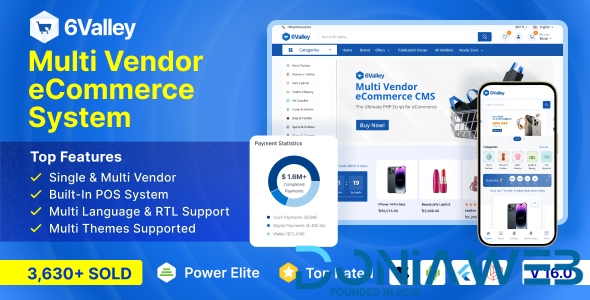
6valley is a modern and flexible multi-vendor e-commerce system where you can organize multiple shops and stores such as digital stores, fashion stores, sports stores, home & living stores, health & beauty stores, and many others in one platform. In simple words, you’ll get All Things Under One Roof!
Business owners dealing with eCommerce, electronics shops, online shops, online delivery, order, and Multi-vendor/Single-vendor online business will find this package to be extremely useful. You can offer your customers the best shopping experience with its mobile-optimized design.
This script is a clean and modern solution for online marketplaces. With a clean, trendy design, 6valley will make your online store more impressive and appealing. Enhance your customers’ ability to buy your products quickly by increasing your conversion rate.
PHP Laravel is used to develop both the Web frontend and Admin panel for 6valley. It will also be available on iOS and Android thanks to Flutter’s cross-platform development!
15+ Reasons to Buy 6valley:
- A complete multi-vendor eCommerce system.
- Easy to organize shops and stores under one e-Commerce system.
- 2 SUPERB Web panels: Admin Panel & Seller panel. (Developed Using Laravel)
- 3 mobile applications: User app, Seller app, and Deliveryman app. (Developed using Flutter, Please note the Deliveryman app is not included you need to purchase it separately)
- Modern website. (Developed Using Laravel blade)
- Multiple themes.
- All the apps are available on PlayStore (Android) & AppStore (iOS).
- Phenomenal features to enhance the multi-vendor online ordering and delivery system.
- 100% responsive design to provide a great user experience.
- An Admin Dashboard that holds everything together.
- Managing customers at ease.
- Constant development with regular updates.
- Clean, well-structured and maintainable code
- Active customer support to help.
- Value for money system.
- Flexible prices, no surprises!
What's New in Version 16.0
Released
Version 16.0 06 January 2026
- Implemented global file size and file type validation for a secure and consistent file upload system-wide.
- Optimized image uploads by compressing files and converting them to WebP format.
- Polished overall admin and vendor panel dashboard UI.
- Added new admin dashboard insights with proper empty states: Top Customers, Top Delivery Personnel, Most Popular Stores, Top-Selling Products, Vendor Most Popular Products.
- Improved POS UI with enhanced usability and new filter options.
- Polished Order Invoice design with sidebar details view, billing UI with improved item table design, product removal options, clearer pricing details, and refined discount tags in the POS.
- Improved Product Bulk Import UI for better clarity.
- Enhanced Product Details UI with support for multiple images and thumbnail editing.
- Refined Order Details, Refund List, and Refund Details UI.
- Improved handling of unavailable products in refund workflows.
- Enhanced inventory management UI, including Restock Request toasters.
- Brand management improvements: add, edit, and view brands from the sidebar, with a brand reassignment option during deletion.
- Improved In-House and Vendor Product Lists with better handling of long product names, stock limits, and added sidebar filter options.
- Enhanced Attribute Setup with sidebar edit/view options.
- Polished Product Add/Edit and Product Gallery UI with sidebar details and filters.
- Polished Product Reviews UI with sidebar filters.
- Added vendor dashboard insights with empty states: Top Delivery Personnel, Vendor Most Popular Products, Top-Selling Products.
Vendor features aligned with Admin panel enhancements.
- UI improvements for Flash Deals, Top Stores, Category-wise Products, and Quick View in the Aster Theme.
- Polished Homepage Product Cards, Category-wise and Brand-wise Listings, and Quick View in the Default Theme.
- Wishlist Redesign: enhanced product cards with better background, standardized card size, “Stock Out” tag, and wishlist search feature in both themes.
- Categories Section: improved category list UI with cleaner layout and updated icons.
- Product Add-to-Cart Redesign: improved layout, visuals, and usability for smoother interactions.
- Popular & Top Selling Products: improved card design, cleaner rating display, better text handling, and added “View All” navigation.
- Product Details: standardized product description font sizes for visual consistency.
- My Orders (Order Details & Summary): enhanced product cards, clearer variation info, and hidden tax labels when not applied.
- Refund: redesigned refund list UI with clear display of Order ID, refund date, reason, and product info.
- Profile: polished UI and enabled clickable product items redirecting to the product list.
- My Shop: improved UI and clickable product items redirecting to the product list.
- Add/Update Product: default language input tab, clearer variation type selection, access to variation setup and product SEO.
- Product List: redesigned layout with fixed action menus, better long-text handling, filter indicators, approval status tabs, and improved review page UI.
- Reviews: enhanced coupon list UI with clearer details, user limits, and meaningful toast messages for status changes.
- Restock: improved visual polish and clarity of the product item table in the restock section.
- Fixed various known issues for improved stability in all panels, website, and apps
- Made all Flutter apps compatible with Flutter SDK 3.38.5-
 3
3
-
 10
10
-
 2
2
-
.png) 3
3
-
.gif) 2
2

.thumb.png.6dc5cae5109b2c524304dfaadb3039d0.png)


.thumb.jpg.93a7cd2abe39fcd709f0e1522cd3734b.jpg)
.thumb.jpg.b7481a4e724930fcd9e04b0700b9f87c.jpg)




.thumb.png.92c081e03313934b509ca74a8fb8972e.png)



You may only provide a review once you have downloaded the file.
There are no reviews to display.